Endpoint Basic Settings/Advanced Settings List
In the API screen, you can add/update API endpoints.
Each endpoint can have parameters to control its behavior.
Here, we explain the parameters that can be set for endpoints.
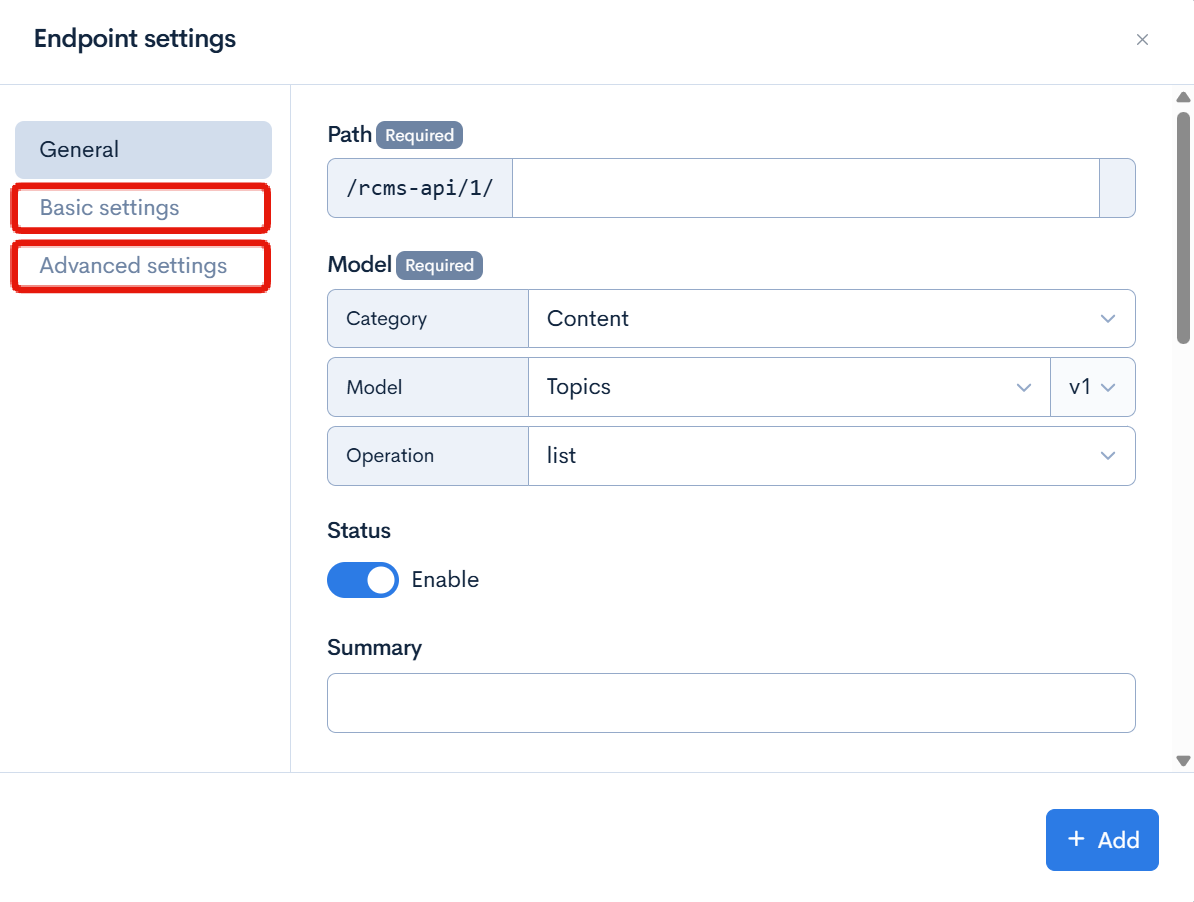
Endpoint Settings Screen
In the endpoint settings, when you select a model, the parameters that can be set for the selected model are displayed.
Authentication
Login
login_challenge
| Field | Parameter | Description |
|---|
| Basic Settings | login_method | Select the authentication method. Possible values: api_key/signature (authentication using API key and signature). If not set, authentication will be based on email address and password. |
| twofactor_method | If enabling two-factor authentication, select the method. Possible values: code (TOTP), email (email), SMS (SMS) |
| Advanced Settings | use_recaptcha | Check to use reCAPTCHA during login. |
login_challenge_mfa
No parameters can be set.
token
| Field | Parameter | Description |
|---|
| Basic Settings | use_refresh_token | Check to use refresh token. |
| access_token_lifespan | Set the duration in seconds for which the access token is valid. |
| refresh_token_lifespan | Set the duration in seconds for which the refresh token is valid. |
file_access_token
| Field | Parameter | Description |
|---|
| Basic Settings | access_token_lifespan | Set the duration in seconds for which the file access token is valid. Default is 300 seconds (5 minutes). |
alias_login
No parameters can be set.
logout
No parameters can be set.
reminder
| Field | Parameter | Description |
|---|
| Basic Settings | password_reset_page_url | URL of the password reset page shown in the user's email. Token will be automatically added as a query parameter. |
| Advanced Settings | token_fragment_flg | Check to pass the token in URL fragment format (by default, query parameter is used). |
| use_recaptcha | Check to use reCAPTCHA when sending reminder emails. For more details, refer to Creating a Password Reminder Using reCAPTCHA. |
reset_password
No parameters can be set.
profile
| Field | Parameter | Description |
|---|
| Basic Settings | basic_info | Specify the attributes of user information to retrieve. (Multiple values possible) Example: email, nickname |
gcs_info
No parameters can be set.
firebaseToken
| Field | Parameter | Description |
|---|
| Basic Settings | firebaseConfig | Select add to include firebaseConfig information in the response. |
LoginHistory
list
| Field | Parameter | Description |
|---|
| Basic settings | cnt | Specifies the number of items to display per page. |
| allowed_group_ids | Specifies the group IDs allowed to view. Only login histories of members belonging to the specified groups will be targeted. |
| self_only | When checked, only the login history of oneself will be targeted. |
| from_date | Specifies the start date for the search. |
| to_date | Specifies the end date for the search. |
| login_type | Specifies the type of login. |
| member_id | Specifies the member ID to target. |
| add_member_info_cols | Specifies the member attributes to retrieve. (Multiple possible) e.g. email, nickname |
| only_count | Returns only the number of results without including search result data for performance improvement. |
LoginFailed
list
| Field | Parameter | Description |
|---|
| Basic settings | cnt | Specifies the number of items to display per page. |
| allowed_group_ids | Specifies the group IDs allowed to view. Only login failure histories of members belonging to the specified groups will be targeted. |
| self_only | When checked, only the login failure history of oneself will be targeted. |
| from_date | Specifies the start date for the search. |
| to_date | Specifies the end date for the search. |
| member_id | Specifies the member ID to target. |
| only_count | Returns only the number of results without including search result data for performance improvement. |
TwofactorMethod
reserve
No parameters can be set.
regist
No parameters can be set.
reminder
| Field | Parameter | Description |
|---|
| Basic settings | use_sms | When checked, sends the two-factor authentication reset code via SMS. |
reset
No parameters can be set.
delete
No parameters can be set.
Content
Topics
list
| Item | Parameter | Description |
|---|
| Basic Settings | topics_group_id | Specify the content structure ID to target. |
| contents_type | Specify the category ID to display. If not set, all categories will be targeted. |
| filter | Query parameter to narrow down the data. Refer to How to Use the Search Function for details. |
| filter_lang | Specify the language of the filter. |
| filter_request_allow_list | Specify the items that can be specified in the filter request. If not specified, filtering by query is not possible. If you want to allow all items, set :ALL. |
| cnt | Specify the number of items to display per page. |
| order_query | Specify the order.
Example: topics_id:asc, topics_id:desc
Possible items: topics_id, order_no, ymd, post_time, contents_type, subject, regular_flg, inst_ymdhi, update_ymdhi, topics_group_id, favorite_cnt, comment_cnt |
| groupBy | Select category to group by category. |
| ext_group | Check to group the extended items. |
| Advanced Settings | type | Select the type of grouping (array or object), default: array |
| group_by_category_id | Specify the category ID to narrow down when grouping by category. |
| show_empty_categories | Check to display categories with no content when grouping by category. |
| order_by_category_count | Check to order by the number of items per category when grouping by category. |
| has_permissions | Return the response only if the user accessing the endpoint has the permissions set in the parameters ('insert', 'update', 'delete'). For example, if an editing user with only update permission accesses an endpoint set with has_permissions=delete, no data will be returned as they do not have the required permission. |
| category_grouping_type | Select the format of the category grouping key. Possible value: object |
| category_grouping_type_use_slug | Use the slug as the key in category grouping. |
| max_distance | Specify the maximum distance. (Used for location-based search) |
| category_parent_id | Specify the parent category to narrow down. |
| exclude_category_parent_id | Specify the category IDs not to display. |
| ext_column | Narrow down the list by the value of extended items.
Example of narrowing down by specified value: ext_column=ext_col_02:15
Example of narrowing down by values other than specified: ext_column=ext_col_02!:15 |
| ymd_sort_change | Enter ymd_sort_change=on if you want to change the order of contents to ascending by date. (Default is descending.) |
| shuffle | Specify whether to display in random order (yes/no). Normally not random. |
| target_col_for_keyword | Specify the target column for keyword search. If not set, title, content, category, and extended items will be targeted. Note: Set to subject, contents, contents_type, or extended item number (ext_col_01, ext_col_10, etc.). |
| use_target_col_for_keyword_from_request | Use narrowing down the target items for keyword search in the request. |
| topics_keyword_cond | Change the filtering method for each keyword in the search by topics_keyword. (Default: AND) |
| full_text_search_cond | Change the filtering method for each keyword in full-text search. Possible values: AND, OR |
| tag_category_id | Specify the tag category ID to display. If not set, all categories will be targeted. |
| exclude_tag_category_id | Specify the tag category IDs to exclude from display. |
| tag_id | Specify the tag ID to display. |
| exclude_tag_id | Specify the tag IDs to exclude from display. |
| tag_cond | Change the filtering method for tags (Default: OR) |
| topics_id | Set the content ID to display. |
| order_by_id | Specify the order by topics_id. Data with the specified topics_id will be displayed at the top. |
| exclude_topics_id | Specify the content IDs to exclude. |
| get_comment_cnt | Add the number of comments to the response by checking. |
| get_unlisted_data | Include data not listed in the response by checking. |
| comment_cond_date | Set the date condition when getting the number of comments. (Example: for 7 days ago, use "-7 day") |
| get_favorite_cnt | Add the number of favorites to the response by checking. |
| my_favorite_list | Narrow down the contents to those favorited by the user by checking. |
| my_comment_list | Narrow down the contents commented by the user by checking. |
| my_own_list | Narrow down the user's own contents by checking. |
| add_owner_info_cols | Specify the content owner attributes to retrieve. (Multiple possible) Example: email, nickname |
| required_param | Specify the query parameters that must be set. |
| add_my_favorite_flg | Add whether the user who called the endpoint has favorited the content to the response by checking.
Favorited: "my_favorite_flg": true
Not favorited: "my_favorite_flg": false |
| only_count | Return only the number of results without including search result data for performance improvement. |
| favorite_action_type | Specify the favorite action type to further narrow down when my_favorite_list is enabled. |
| exclude_favorited_topics | Exclude favorited data from the results. |
| get_tag_flg | Add tag information to the response by checking. |
| get_tag_order_by_tag_category | When get_tag_flg is enabled, check to list tags by category. |
| ignore_open_flg | Include unpublished contents in the response by checking. |
| ignore_category_open_flg | Include contents of unpublished categories in the response by checking. |
| ignore_tag_open_flg | Include contents of unpublished tags in the response by checking. |
| central_id | Specify the ID to be the center of retrieval. |
| add_open_ymdhi | Include the start and end date and time of publication in the response by checking. |
| ignore_restrict_flg | Ignore access restrictions by checking. |
| use_pre_embedding_text | Use pre-generated embedding text by checking. |
| max_list_chars | Specify the maximum number of characters to display in the list. Set to 0 for no limit. |
Details
| Item | Parameter | Description |
|---|
| Basic Settings | topics_group_id | Specify the ID of the content structure to target. |
| contents_type | Specify the category ID to display. If not set, all categories will be targeted. |
| filter | Query parameter to narrow down the data. For more information, refer to How to Use the Search Function. |
| filter_lang | Specify the language of the filter. |
| filter_request_allow_list | List of items that can be specified in the filter request (Default: No target items / To allow all items, set :ALL). |
| ext_group | Group together extended items when checked. |
| Advanced Settings | category_parent_id | Specify the parent category to narrow down. |
| exclude_category_parent_id | Specify the category IDs not to display. |
| ext_column | Filter the list by the value of an extended item.
Example of filtering by a specified value: ext_column=ext_col_02:15
Example of filtering by values other than specified: ext_column=ext_col_02!:15 |
| target_col_for_keyword | Specify the column to target for keyword search. If not set, the title, content, category, and extended items will be targeted. Note) Set to subject, contents, contents_type, or extension item number (ext_col_01, ext_col_10, etc.). |
| use_target_col_for_keyword_from_request | Use the narrowing down of target items for keyword search in the request. |
| topics_keyword_cond | Change the filtering method for each keyword in keyword search (Default: AND). |
| full_text_search_cond | Change the filtering method for each keyword in full-text search. Selectable values: AND, OR. |
| tag_category_id | Specify the tag category ID to display. If not set, all categories will be targeted. |
| exclude_tag_category_id | Specify the tag category IDs to exclude from display. |
| tag_id | Specify the tag IDs to display. |
| exclude_tag_id | Specify the tag IDs to exclude from display. |
| tag_cond | Change the filtering method for tags (Default: OR). |
| exclude_topics_id | Specify the content IDs to exclude. |
| get_comment_cnt | When checked, the response will include the number of comments. |
| get_unlisted_data | When checked, the response will include data not listed in the list. |
| comment_cond_date | Set the date condition for obtaining the number of comments. (Example: for 7 days ago, use "-7 day"). |
| get_favorite_cnt | When checked, the response will include the number of favorites. |
| my_favorite_list | Filter the contents by the user's favorites when checked. |
| my_comment_list | Filter the contents by the user's commented contents when checked. |
| my_own_list | Filter the contents by the user's owned contents when checked. |
| add_owner_info_cols | Specify the content owner attributes to retrieve. (Multiple possible) Example: email, nickname. |
| required_param | Specify the query parameters that must be included. |
| add_my_favorite_flg | When checked, the response will indicate whether the user who called the endpoint has favorited the content or not.
Favorited: "my_favorite_flg": true
Not favorited: "my_favorite_flg": false |
| favorite_action_type | When my_favorite_list is enabled, further narrow down by specifying the favorite action type. |
| exclude_favorited_topics | Exclude favorited data from the results. |
| get_tag_flg | When checked, the response will include tag information. |
| get_tag_order_by_tag_category | When get_tag_flg is enabled, check to order tags by category. |
| ignore_open_flg | Include unpublished contents in the response when checked. |
| ignore_category_open_flg | Include contents from unpublished categories in the response when checked. |
| ignore_tag_open_flg | Include contents from unpublished tags in the response when checked. |
| add_open_ymdhi | Include the start and end date and time of publication in the response when checked. |
| ignore_restrict_flg | Ignore access restrictions when checked. |
| use_pre_embedding_text | Use pre-generated embedding text when checked. |
| max_list_chars | Specify the maximum number of characters for list display. 0 for no limit. |
preview
| Item | Parameter | Description |
|---|
| Basic Settings | topics_group_id | Specify the ID of the content structure to target. |
| contents_type | Specify the category ID to display. If not set, all categories will be targeted. |
| filter | Query parameter to narrow down the data. For more information, refer to How to Use the Search Function. |
| filter_lang | Specify the language of the filter. |
| filter_request_allow_list | List of items that can be specified in the filter request (Default: No target items / If you want to allow all items, set :ALL). |
| ext_group | Check to group together extended items. |
| Advanced Settings | category_parent_id | Specify the parent category to narrow down. |
| exclude_category_parent_id | Specify the category IDs not to display. |
| ext_column | Filter the list by the value of the extended item.
Example of filtering by a specified value: ext_column=ext_col_02:15
Example of filtering by values other than the specified one: ext_column=ext_col_02!:15 |
| target_col_for_keyword | Specify the column to target for keyword search. If not set, the title, content, category, and extended items will be targeted. Note) Set subject, contents, contents_type, or extension item number (ext_col_01, ext_col_10, etc.). |
| use_target_col_for_keyword_from_request | Use filtering of target items for keyword search in the request. |
| topics_keyword_cond | Change how to narrow down for each keyword in keyword search (Default: AND). |
| full_text_search_cond | Change how to narrow down for each keyword in full-text search. Selectable values: AND, OR. |
| tag_category_id | Specify the tag category ID to display. If not set, all categories will be targeted. |
| exclude_tag_category_id | Specify the tag category IDs to exclude from display. |
| tag_id | Specify the tag ID to display. |
| exclude_tag_id | Specify the tag IDs to exclude from display. |
| tag_cond | Change how to narrow down tags (Default: OR). |
| exclude_topics_id | Specify the content IDs to exclude. |
| get_comment_cnt | Add the number of comments to the response by checking. |
| get_unlisted_data | Include data not listed in the response by checking. |
| comment_cond_date | Set the date condition for getting the number of comments. (Example: For 7 days ago, set "-7 day"). |
| get_favorite_cnt | Add the number of favorites to the response by checking. |
| my_favorite_list | Filter contents by the user's favorites by checking. |
| my_comment_list | Filter contents commented by the user by checking. |
| my_own_list | Filter contents owned by the user by checking. |
| add_owner_info_cols | Specify the content owner attributes to retrieve. (Multiple possible) Example) email, nickname. |
| required_param | Specify the query parameters that must be set. |
| add_my_favorite_flg | If checked, the response will indicate whether the user who called the endpoint has favorited the content or not.
Favorited: "my_favorite_flg": true
Not favorited: "my_favorite_flg": false |
| favorite_action_type | When my_favorite_list is enabled, further narrow down by specifying the favorite action type. |
| exclude_favorited_topics | Exclude favorited data from the target when my_favorite_list is enabled. |
| get_tag_flg | Add tag information to the response by checking. |
| get_tag_order_by_tag_category | If get_tag_flg is enabled, order tags by category. |
| ignore_open_flg | Include unpublished content in the response by checking. |
| ignore_category_open_flg | Include content from unpublished categories in the response by checking. |
| ignore_tag_open_flg | Include content from unpublished tags in the response by checking. |
| add_open_ymdhi | Include the start and end date and time of publication in the response by checking. |
| ignore_restrict_flg | Ignore access restrictions by checking. |
| use_pre_embedding_text | Use pre-generated embedding text by checking. |
| max_list_chars | Specify the maximum number of characters for list display. 0 means no limit. |
insert
| Item | Parameter | Description |
|---|
| Basic Settings | topics_group_id | Specify the content structure ID to add. |
| use_columns | Specify the items to use. |
| unuse_columns | Specify the items not to use. |
| require_columns | Specify the required items. |
| ext_group | Check to group extended items. |
| Advanced Settings | validate_only | Perform only input validation, no actual data update. |
| lightweight_mode | Lightweight mode: If enabled, skips execution of post-processing batch, but improves performance instead. |
| upsert_by_columns | If a value is posted to the specified column, update the record with that value. |
| compare_by_columns | Compare the values of the specified columns and update only if there are changes. |
update
| Item | Parameter | Description |
|---|
| Basic Settings | topics_group_id | Specify the content structure ID to update. |
| use_columns | Specify the items to use. |
| unuse_columns | Specify the items not to use. |
| require_columns | Specify the required items. |
| ext_group | Check to group extended items. |
| Advanced Settings | validate_only | Perform only input validation, no actual data update. |
| lightweight_mode | Lightweight mode: If enabled, skips execution of post-processing batch, but improves performance instead. |
delete
| Item | Parameter | Description |
|---|
| Basic Settings | topics_group_id | Specify the content structure ID to delete. |
draft_list
| Item | Parameter | Description |
|---|
| Basic Settings | topics_group_id | Specify the content structure ID to target. |
| self_only | Return/update data corresponding to the logged-in user's (own data) only. |
| cnt | Specify the number of items to display per page. |
| filter | Query parameter to narrow down the data. For more information, refer to How to Use the Search Function. |
| filter_request_allow_list | Specify the items that can be specified in the filter request. If not specified, filtering by query is not possible. If you want to allow all items, set :ALL. |
draft_detail
| Item | Parameter | Description |
|---|
| Basic Settings | topics_group_id | Specify the content structure ID to target. |
| self_only | Return/update data corresponding to the logged-in user's (own data) only. |
| ext_group | Group extended items together. |
draft_save
| Item | Parameter | Description |
|---|
| Basic Settings | topics_group_id | Specify the content structure ID to target. |
| topics_id | Specify the topics_id to target during draft_save. |
| use_columns | Specify the items to use. |
| unuse_columns | Specify the items not to use. |
| require_columns | Specify the required items. |
| ext_group | Check to group extended items. |
| Advanced Settings | upsert_by_columns | If a value is posted to the specified column, update the record with that value. |
| compare_by_columns | Compare the values of the specified columns and update only if there are changes. |
draft_delete
| Item | Parameter | Description |
|---|
| Basic Settings | topics_group_id | Specify the content structure ID to target. |
draft_update
| Item | Parameter | Description |
|---|
| Basic Settings | topics_group_id | Specify the content structure ID to target. |
| topics_id | Specify the content ID to target. |
waiting_for_approval_list
| Item | Parameter | Description |
|---|
| Basic Settings | topics_group_id | Specify the content structure ID to target. |
| self_only | Return/update data only for the logged-in user (own data). |
| cnt | Specify the number of items to display per page. |
| filter | Query parameter to filter data. For more information, refer to How to Use the Search Function. |
| filter_request_allow_list | Specify the items that can be included in the filter request. If not specified, filtering by query is not allowed. To allow all items, set :ALL. |
| get_workflow_info | Check to add workflow information to the response. |
waiting_for_approval_details
| Item | Parameter | Description |
|---|
| Basic Settings | topics_group_id | Specify the content structure ID to target. |
| self_only | Return/update data only for the logged-in user (own data). |
| ext_group | Group together extended items. |
history_list
| Item | Parameter | Description |
|---|
| Basic Settings | topics_group_id | Specify the content structure ID to target. |
| Advanced Settings | diff_only | Retrieve only the items. (The detail element will not be included in the response.) 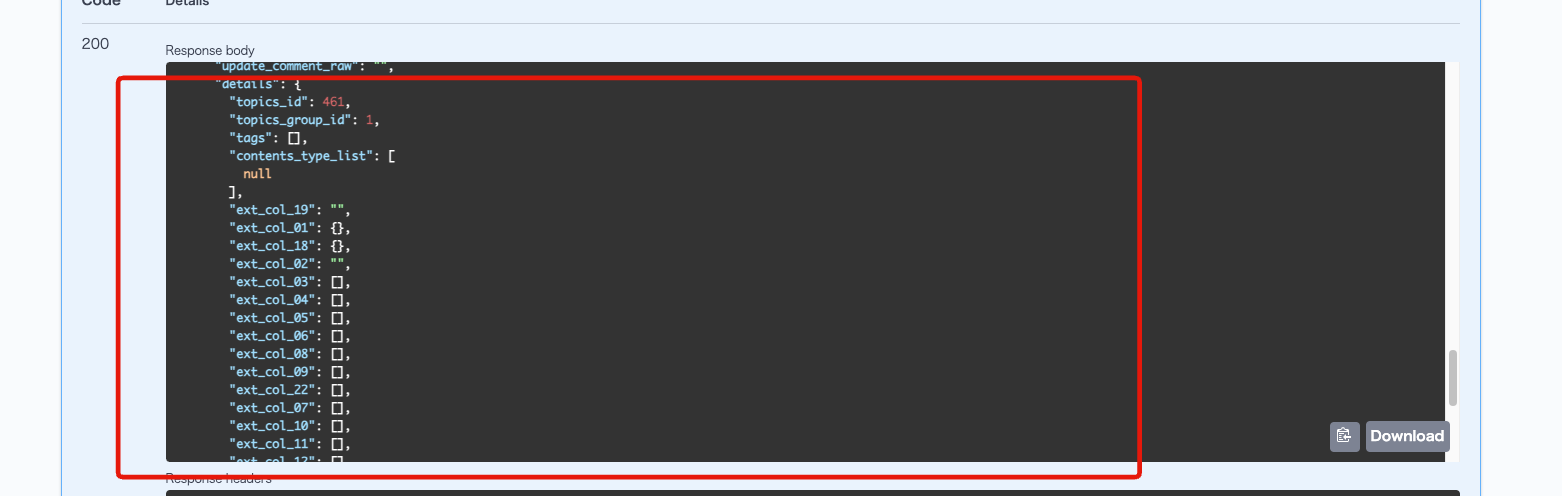 |
accept
| Item | Parameter | Description |
|---|
| Basic Settings | topics_group_id | Specify the content structure ID to target. |
| use_columns | Specify the columns to use. |
| unuse_columns | Specify the columns not to use. |
| require_columns | Specify the required columns. |
| ext_group | Check to group together extended items. |
| Advanced Settings | validate_only | Perform input validation only, without updating actual data. |
reject
| Item | Parameter | Description |
|---|
| Basic Settings | topics_group_id | Specify the content structure ID to target. |
bulk_upsert
| Item | Parameter | Description |
|---|
| Basic Settings | topics_group_id | Specify the content structure ID to target. |
| use_columns | Specify the columns to use. |
| unuse_columns | Specify the columns not to use. |
| require_columns | Specify the required columns. |
| ext_group | Check to group together extended items. |
| Advanced Settings | postprocess_min_after | Specify how many minutes after the update to register the post-processing batch (default: 1) |
| lightweight_mode | Lightweight mode: If enabled, skips the execution of post-processing batch for improved performance. |
| id_reference_allow_list | Specify the data IDs from external systems. |
| ignore_errors | Continue processing even if errors occur. |
| validate_only | Perform input validation only, without updating actual data. |
bulk_download
| Field | Parameter | Description |
|---|
| Basic Settings | topics_group_id | Specify the ID of the content structure to target. |
| file_type | Select the file type. (Default is csv. For file downloads, select file) |
| filter | Query parameter to narrow down the data. For more information, refer to How to Use the Search Function. |
| order_query | Specify the order. Example: topics_id=ASC |
| filter_request_allow_list | List of items that can be specified in the filter request (Default: no target items / If you want to allow all items, set :ALL) |
| output_columns | Specify the columns to output. |
increment
| Field | Parameter | Description |
|---|
| Basic Settings | topics_group_id | Specify the ID of the content structure to target. |
| ext_nm | Specify the target extension item name (ID/Slug). |
| index | For array-type extension items, specify the index. |
| Advanced Settings | nums | Specify the limit of the numerical value that can be incremented or decremented. |
| num | Specify the fixed numerical value to increment or decrement. |
| use_recaptcha | Check to use reCAPTCHA. |
TopicsCategory
list
| Field | Parameter | Description |
|---|
| Basic Settings | topics_group_id | Specify the ID of the content structure to target. |
| contents_type | Specify the category ID to display. If not set, all categories will be targeted. |
| cnt | Specify the number of items to display per page. |
| only_count | Return only the number of results without search result data for performance improvement. |
| Advanced Settings | count_by_category | Get the number of items by category. Do not get: 0 (Default) Get: 1 |
| count_by_category_method | Select the method of aggregating category counts. You can specify counts for only parent categories or including child categories. |
| order_by_count | Sort by the number of items per category. |
| ignore_open_flg | Check to include unpublished categories in the response. |
TopicsGroup
list
| Field | Parameter | Description |
|---|
| Basic Settings | topics_group_id | Specify the ID of the content structure to target. |
| cnt | Specify the number of rows to display per page. |
details
| Field | Parameter | Description |
|---|
| Basic Settings | topics_group_id | Specify the ID of the content structure to target. |
| ext_config_flg | Specify whether to get the extension item settings. The retrieved extension information will be assigned to $extensions_config. |
| ext_no_for_count | Specify the selection extension number for which you want to get the count. |
insert
| Field | Parameter | Description |
|---|
| Basic Settings | open_flg | Set the public flag. |
Members
Member
list
| Item | Parameter | Description |
|---|
| Basic Settings | filter | Query parameter to filter data. For more information, refer to How to Use the Search Function. |
| filter_request_allow_list | List of items that can be specified in the filter request (Default: No target items / If you want to allow all items, set :ALL). |
| cnt | Specifies the number of items displayed per page. |
| order_query | Specifies the sort order. |
| Advanced Settings | response_ec_data | Includes EC-related data in the response if checked. |
| custom_search_id | Specifies the custom member filter ID to target members. |
| group_id | Specifies the group ID of the members to target. |
| member_id | Specifies the member ID to target. |
| assign_group_flg | Includes group information in the response if checked. |
| open_by_group | Filters the display by group permissions if checked. |
| get_tag_flg | Adds tag information to the response if checked. |
| only_count | Returns only the number of results without including search result data for performance improvement. |
| check_login_lock | Checks the login lock status if checked. |
details
| Item | Parameter | Description |
|---|
| Basic Settings | self_only | Allows API requests only for own information. |
| filter | Query parameter to filter data. For more information, refer to How to Use the Search Function. |
| filter_request_allow_list | List of items that can be specified in the filter request (Default: No target items / If you want to allow all items, set :ALL). |
| order_query | Specifies the sort order. |
| Advanced Settings | response_ec_data | Includes EC-related data in the response if checked. |
| custom_search_id | Specifies the custom member filter ID to target members. |
| group_id | Specifies the group ID of the members to target. |
| assign_group_flg | Includes group information in the response if checked. |
| open_by_group | Filters the display by group permissions if checked. |
| get_tag_flg | Adds tag information to the response if checked. |
| only_count | Returns only the number of results without including search result data for performance improvement. |
| check_login_lock | Checks the login lock status if checked. |
invite
| Item | Parameter | Description |
|---|
| Basic Settings | default_group_ids | Specifies the group ID that members initially belong to. The group ID specified here takes precedence over the initial group setting in the member management function. |
| admin_regist_ok | Register as an administrator (super user). |
| Advanced Settings | use_recaptcha | Uses reCAPTCHA if checked. |
insert
| Item | Parameter | Description |
|---|
| Basic Settings | default_group_id | Specifies the group ID to which the member initially belongs. This group ID specification takes precedence over the initial group setting in the member management function. |
| not_login_after_insert | If checked, the user will not log in after registration. |
| login_ok_flg | If checked, allows login. |
| use_columns | Specifies the items to be used. |
| unuse_columns | Specifies the items not to be used. |
| require_columns | Specifies the required items. |
| Advanced Settings | validate_only | Performs only input validation and does not update actual data. |
| send_email_flg | If checked, sends an email to the user upon completion of member information registration. |
| ignore_force_chpwd | If checked, skips the password change at the first login. |
| use_recaptcha | If checked, uses reCAPTCHA. |
update
| Item | Parameter | Description |
|---|
| Basic Settings | allowed_group_ids | Specifies the groups allowed for updating. |
| self_only | Allows API requests only for one's own information. |
| use_columns | Specifies the items to be used. |
| unuse_columns | Specifies the items not to be used. |
| require_columns | Specifies the required items. |
| Advanced Settings | validate_only | Performs only input validation and does not update actual data. |
| send_email_flg | If checked, sends an email to the user upon completion of member information update. |
| check_current_pwd | Performs verification of the current password. |
| keep_without_allowed_group_ids | Includes members outside the allowed groups as update targets if checked. |
delete
| Item | Parameter | Description |
|---|
| Basic Settings | allowed_group_ids | Specifies the groups allowed for deletion. |
| self_only | Allows API requests only for one's own information. |
bulk_upsert
| Item | Parameter | Description |
|---|
| Basic Settings | init_group_id | Specifies the group ID to which the member initially belongs. This group ID specification takes precedence over the initial group setting in the member management function. |
| allow_set_group | Enables registration with the "Group ID" entered in CSV. |
| use_columns | Specifies the items to be used. |
| unuse_columns | Specifies the items not to be used. |
| require_columns | Specifies the required items. |
| login_ok_flg | Allows login. |
MemberProvisional
list
| Item | Parameter | Description |
|---|
| Basic Settings | registration_status | Selects a filter based on the registration status. Possible values: registered, unregistered |
| cnt | Specifies the number of items displayed per page. |
| only_count | Returns only the number of search results without including the result data for performance improvement. |
insert
| Item | Parameter | Description |
|---|
| Basic Settings | default_group_ids | Specifies the member group ID to be set when registering a member. |
| admin_regist_ok | Registers as an administrator (super user). |
update
No parameters can be set.
delete
No parameters can be set.
MemberCustomSearch
list
| Item | Parameter | Description |
|---|
| Basic Settings | cnt | Specifies the number of items displayed per page. |
| share_type | Selects the sharing type. (1: All, 2: Self only, 3: Group specified) |
| only_count | Returns only the number of search results without including the result data for performance improvement. |
details
No parameters can be set.
insert
| Item | Parameter | Description |
|---|
| Basic Settings | member_allow_list | List of items that can be specified in the member filter request (Default: No items allowed / If you want to allow all items, please set :ALL) |
| inquiry_allow_list | List of items that can be specified in the inquiry filter request (Default: No items allowed / If you want to allow all items, please set :ALL) |
| ec_allow_list | List of items that can be specified in the EC filter request (Default: No items allowed / If you want to allow all items, please set :ALL) |
| staticcontents_allow_list | List of items that can be specified in the static contents filter request (Default: No items allowed / If you want to allow all items, please set :ALL) |
update
| Item | Parameter | Description |
|---|
| Basic Settings | member_allow_list | List of items that can be specified in the member filter request (Default: No items allowed / If you want to allow all items, please set :ALL) |
| inquiry_allow_list | List of items that can be specified in the inquiry filter request (Default: No items allowed / If you want to allow all items, please set :ALL) |
| ec_allow_list | List of items that can be specified in the EC filter request (Default: No items allowed / If you want to allow all items, please set :ALL) |
| staticcontents_allow_list | List of items that can be specified in the static contents filter request (Default: No items allowed / If you want to allow all items, please set :ALL) |
delete
No parameters can be set.
identify
| Item | Parameter | Description |
|---|
| Basic Settings | self_only | You can only make API requests for your own information. |
| Advanced Settings | use_recaptcha | If checked, reCAPTCHA will be used. |
details
| Item | Parameter | Description |
|---|
| Basic Settings | use_columns | Specify the columns to be used. |
| unuse_columns | Specify the columns not to be used. |
| require_columns | Specify the required columns. |
MemberGroup
list
| Item | Parameter | Description |
|---|
| Basic Settings | group_ids | Specify the group IDs to be displayed. |
| only_count | For performance improvement, only return the number of results without including search result data. |
Activity
list
| Field | Parameter | Description |
|---|
| Basic Settings | id | Specify the activity ID to target. |
| module_id | Specify the module ID. |
| module_type | Specify the module type. Example: topics or ec_product or tag or member or comment or csvtable |
| filter | Query parameter to filter the data. For more details, please check here. |
| filter_request_allow_list | List of items that can be specified in the filter request (Default: No target items / To allow all items, set :ALL). |
| order_query | Specify the order. Example: foo=ASC,bar=DESC |
| cnt | Specify the number of items to display per page. |
| Advanced Settings | groupBy | Select the unit of grouping. |
| type | Select the type of grouping. (array or object), Default: array |
| new_order_flg | Display in order of newest. |
| my_list | Get a list of comments made by oneself. |
| to_me_list | Get a list of comments addressed to oneself. |
| from_date | Specify the comment extraction period (start). (Example: "2020-01-01" format, or if you want to specify the past month, set "-1 month"). |
| to_date | Specify the comment extraction period (end). (Example: "2020-01-01" format, or if you want to specify until a month ago, set "-1 month"). |
| member_info | Specify the attributes of the user information for comments to be obtained. (Multiple possible) Example: email, nickname |
| to_member_info | Specify the attributes of the user information for comments addressed to be obtained. (Multiple possible) Example: email, nickname |
| root | Specify the parent comment ID of the tree hierarchy. |
| depth | Specify the hierarchy level of comments. |
| children_cnt | Specify the number of child comments to display. |
| children_pageID | Specify the pageID (which page of data) of the child comments to be obtained. |
| flatten_hierarchy | Convert the tree structure to a flat structure. |
| explain_reason_hidden | Add a field to the response object to explain the reason for hiding the comment. |
| show_hidden_comments | Display hidden comments in the response object. |
insert
| Field | Parameter | Description |
|---|
| Basic Settings | id | Specify the activity ID to target. |
| order_desc_flg | Display in descending order of initial posting date and time. |
| Advanced Settings | use_recaptcha | Use reCAPTCHA. |
update
| Field | Parameter | Description |
|---|
| Basic Settings | id | Specify the activity ID to target. |
| order_desc_flg | Display in descending order of initial posting date and time. |
delete
| Field | Parameter | Description |
|---|
| Basic Settings | id | Specify the activity ID to target. |
| order_desc_flg | Display in descending order of initial posting date and time. |
Favorites
Favorite
List
| Item | Parameter | Description |
|---|
| Basic Settings | action_type | Specify the type of action to target. Can be specified by number or slug name. (Default: 0) |
| filter | Query parameter to narrow down the data. For more details, please check here. |
| filter_request_allow_list | List of items that can be specified in the filter request. (Default: No target items / To allow all items, set :ALL) |
| module_type | Specify the module type to target. (Default: topics) |
| cnt | Specify the number of items to display per page. |
| order | Specify the order. Example: inst_ymdhi:desc |
| self_only | Allows API requests only for own information. |
| Advanced Settings | groupBy | Select the unit of grouping. |
| type | Select the type of grouping. (array or object), Default: array |
| only_count | Returns only the number of results without including search result data for performance improvement. |
| my_list | Get a list of favorites for the logged-in user. |
| member_info | Specify the attributes of user information to be retrieved. (Multiple possible) Example: email, nickname |
Insert
| Item | Parameter | Description |
|---|
| Basic Settings | action_type | Specify the type of action to target with a number. (Default: 0) |
| module_type | Specify the module type to target. (Default: topics) |
| Advanced Settings | skip_cache_clear_on_favorite | Skip purging CDN cache when registering favorites. |
| use_recaptcha | Use reCAPTCHA. |
Delete
| Item | Parameter | Description |
|---|
| Basic Settings | action_type | Specify the type of action to target. Can be specified by number or slug name. (Default: 0) |
| module_type | Specify the module type to target. (Default: topics) |
| identify_by | Select the method of identifying the resource. (favorite_id or body) |
| Advanced Settings | skip_cache_clear_on_favorite | Skip purging CDN cache when deleting favorites. |
InquiryMessage
List
| Item | Parameter | Description |
|---|
| Basic Settings | inquiry_id | Specify the form ID to target. |
| self_only | Allows API requests only for own information. |
| filter | Query parameter to narrow down the data. For more details, please check here. |
| filter_request_allow_list | List of items that can be specified in the filter request. (Default: No target items / To allow all items, set :ALL) |
| order_query | Specify the order. Example: foo=ASC,bar=DESC |
| member_info | Specify the attributes of user information for the answers to be retrieved. (Multiple possible)
Example: email, nickname |
| only_count | Returns only the number of results without including search result data for performance improvement. |
| Advanced Settings | include_child | Also retrieve distributed answers. |
| cnt | Specify the number of items to display per page. |
Details
| Item | Parameter | Description |
|---|
| Basic Settings | inquiry_id | Specify the form ID to target. |
| self_only | Allows API requests only for own information. |
| member_info | Specify the attributes of user information for the answers to be retrieved. (Multiple possible) Example: email, nickname |
send
| Field | Parameter | Description |
|---|
| Basic Settings | id | Specify the form ID you want to target. |
| assign_status | Specify the status to assign to the response. |
| Advanced Settings | validate_only | Perform input validation. |
| member_info_flg | Retrieve information of the logged-in member and assign it as $member_info in the message template. |
| allow_parent_inquiry_bn_id | Allow specifying the parent response ID (parent_inquiry_bn_id) in the request body. |
| use_recaptcha | Use reCAPTCHA. |
update
| Field | Parameter | Description |
|---|
| Basic Settings | id | Specify the form ID you want to target. |
| self_only | Allow API requests only for your own information. |
| use_columns | Specify the columns to be used. |
| Advanced Settings | validate_only | Perform input validation. |
delete
| Field | Parameter | Description |
|---|
| Basic Settings | id | Specify the form ID you want to target. |
| self_only | Allow API requests only for your own information. |
bulk_upsert
| Field | Parameter | Description |
|---|
| Basic Settings | id | Specify the form ID you want to target. |
| self_only | Allow API requests only for your own information. |
| permission | Select the operation to be allowed (insert or update). |
list
| Field | Parameter | Description |
|---|
| Basic Settings | inquiry_id | Specify the form ID you want to target. |
| filter | Query parameter to narrow down the data. Please refer to here for details. |
| filter_request_allow_list | List of items that can be specified in the filter request (Default: no target items / Set :ALL to allow all items). |
| cnt | Specify the number of items to display per page. |
| only_count | Return only the number of results without search result data for performance improvement. |
| Advanced Settings | cols_type | Select the column type. |
| show_all_status | Display all statuses. |
details
| Field | Parameter | Description |
|---|
| Basic Settings | target_inquiry_id | Specify the form ID you want to target. |
| filter | Query parameter to narrow down the data. Please refer to here for details. |
| filter_request_allow_list | List of items that can be specified in the filter request (Default: no target items / Set :ALL to allow all items). |
| only_count | Return only the number of results without search result data for performance improvement. |
| Advanced Settings | cols_type | Select the column type. |
| show_all_status | Display all statuses. |
insert
| Field | Parameter | Description |
|---|
| Basic Settings | validate_only | Perform input validation. |
update
| Field | Parameter | Description |
|---|
| Basic Settings | validate_only | Perform input validation. |
delete
No parameters can be set.
report
| Field | Parameter | Description |
|---|
| Basic Settings | inquiry_id | Specify the form ID you want to target. |
Notification
MagazineInfo
list
| Field | Parameter | Description |
|---|
| Basic Settings | magazine_id | Specify the notification ID to target. |
| exclude_magazine_id | Specify the notification ID to exclude. |
| cnt | Specify the number of items to display per page. |
| self_only | Allow API requests only for your own information. |
| only_count | Return only the number of results without search result data for performance improvement. |
MagazineSubscriber
list
| Field | Parameter | Description |
|---|
| Basic Settings | magazine_id | Specify the target notification ID. |
| cnt | Specify the number of items to display per page. |
| filter | Query parameter to narrow down the data. For more details, check here. |
| filter_request_allow_list | List of items that can be specified in the filter request (Default: No target items / Set :ALL to allow all items). |
| only_count | Returns only the number of results without including search result data for performance improvement. |
subscribe
| Field | Parameter | Description |
|---|
| Basic Settings | allow_magazine_id | Specify the subscription allowed ID. |
| self_only | Allows API requests only for own information. |
unsubscribe
| Field | Parameter | Description |
|---|
| Basic Settings | allow_magazine_id | Specify the unsubscribe allowed ID. |
| self_only | Allows API requests only for own information. |
| required_key | Request subscriber key. |
Magazine
send
| Field | Parameter | Description |
|---|
| Basic Settings | allow_magazine_id | Specify the notification ID allowed for sending. |
| destination_id | Specify the custom member filter ID to send. |
| allow_destination_id | Specify the custom member filter ID allowed for sending. |
| mail_type | Select mail_type. 0: Text mail 1: HTML mail 3: Mobile mail |
| mail_template_name | Specify the HTML mail template name. |
| mail_text_template_name | Specify the text mail template name. |
| subject | Specify the subject. |
delete
| Field | Parameter | Description |
|---|
| Basic Settings | allow_magazine_id | Specify the notification ID allowed for deletion. |
subscribe
| Field | Parameter | Description |
|---|
| Basic Settings | allow_magazine_id | Specify the notification ID allowed for subscription. |
unsubscribe
| Field | Parameter | Description |
|---|
| Basic Settings | allow_magazine_id | Specify the notification ID allowed for unsubscription. |
list
| Field | Parameter | Description |
|---|
| Basic Settings | allow_magazine_id | Specify the notification ID allowed for viewing. |
| cnt | Specify the number of items to display per page. |
| self_only | Allows API requests only for own information. |
| filter | Query parameter to narrow down the data. For more details, check here. |
| filter_request_allow_list | List of items that can be specified in the filter request (Default: No target items / Set :ALL to allow all items). |
| order_query | Specify the sort order. Example) foo=ASC,bar=DESC |
| only_count | Returns only the number of results without including search result data for performance improvement. |
E-commerce
ECOrderSubscription
list
| Field | Parameter | Description |
|---|
| Basic Settings | self_only | Allows API requests only for own information. |
| only_count | Returns only the number of results without including search result data for performance improvement. |
details
| Field | Parameter | Description |
|---|
| Basic Settings | self_only | Allows API requests only for own information. |
insert
No parameters can be set.
auth_sp_career
No parameters can be set.
ECOrder
list
| Field | Parameter | Description |
|---|
| Basic Settings | self_only | Allows API requests only for own information. |
| only_count | Returns only the number of results without including search result data for performance improvement. |
details
| Item | Parameter | Description |
|---|
| Basic Settings | self_only | Allows API requests only for your own information. |
total
No parameters can be set.
purchase
| Item | Parameter | Description |
|---|
| Basic Settings | validate_only | Performs input validation. |
cancel
| Item | Parameter | Description |
|---|
| Basic Settings | self_only | Allows API requests only for your own information. |
| send_mail | Sends an email. |
insert
No parameters can be set.
auth_sp_career
No parameters can be set.
ECDelivery
list
No parameters can be set.
details
No parameters can be set.
ECCart
details
No parameters can be set.
add
No parameters can be set.
update
No parameters can be set.
ECShop
list
| Item | Parameter | Description |
|---|
| Basic Settings | show_email_properties | Option to show or hide email properties for inquiries, etc. |
| only_count | Returns only the number of results without search result data for performance improvement. |
details
| Item | Parameter | Description |
|---|
| Basic Settings | show_email_properties | Option to show or hide email properties for inquiries, etc. |
ECProduct
list
| Field | Parameter | Description |
|---|
| Basic Settings | topics_group_id | Specifies the content structure ID to target. |
| contents_type | Specifies the category ID to display. If not set, all categories will be targeted. |
| filter | Query parameter to narrow down the data. For more information, refer to How to Use the Search Function. |
| filter_request_allow_list | Specifies the items allowed in the filter request. If not specified, filtering by query is not possible. To allow all items, set :ALL. |
| cnt | Specifies the number of items to display per page. |
| order_query | Specifies the sort order.
Example: topics_id:asc, topics_id:desc
Sortable fields: topics_id, order_no, ymd, post_time, contents_type, subject, regular_flg, inst_ymdhi, update_ymdhi, topics_group_id, favorite_cnt, comment_cnt |
| product_id | Specifies the product ID to display. If not set, all products are targeted. |
| ec_ext_options_search | Specifies whether to filter the product list by extended item options. Specify: 1 Do not specify: 0 |
| my_order_flg | Displays products purchased by the user. |
| ignore_product_open_flg | Displays unpublished products. |
| Advanced Settings | category_parent_id | Filters by parent category. Specify the parent category to filter by. |
| exclude_category_parent_id | Specifies the category IDs not to display. |
| ext_column | Filters the list by the value of extended items. Example: To filter by a specified value) ext_column=ext_col_02:15 Example: To filter by values other than the specified) ext_column=ext_col_02!:15 |
| ymd_sort_change | If you want to change the order of contents to ascending date, enter ymd_sort_change=on. (Default is descending.) |
| shuffle | Specifies whether to display in random order (yes/no). Normally not random. |
| target_col_for_keyword | Specifies the target column for keyword search. If not set, title, content, category, and extended items are targeted. Note: Set to subject, contents, contents_type, or extension item number (ext_col_01, ext_col_10, etc.). |
| use_target_col_for_keyword_from_request | Utilizes narrowing down the target items for keyword search in the request. |
| topics_keyword_cond | Changes the filtering method for each keyword in keyword search. (Default: AND) |
| full_text_search_cond | Changes the filtering method for each keyword in full-text search. Selectable values: AND, OR |
| tag_category_id | Specifies the tag category ID to display. If not set, all categories are targeted. |
| exclude_tag_category_id | Specifies the tag category IDs to exclude from display. |
| tag_id | Specifies the tag ID to display. |
| exclude_tag_id | Specifies the tag IDs to exclude from display. |
| tag_cond | Changes the tag filtering method (Default: OR) |
| topics_id | Sets the content ID to display. |
| order_by_id | Specifies the sort order by topics_id. Data with the specified topics_id will be displayed at the top. |
| exclude_topics_id | Specifies the content IDs to exclude. |
| get_comment_cnt | Gets the number of comments. |
| get_unlisted_data | Gets data not listed in the list. |
| comment_cond_date | Sets the date condition when getting the number of comments. (Example: for 7 days ago, enter "-7 day") |
| get_favorite_cnt | Gets the number of favorites. |
| my_favorite_list | Filters by contents favorited by the user. |
| my_comment_list | Filters by contents the user has commented on. |
| my_own_list | Filters by contents owned by the user. |
| add_owner_info_cols | Specifies the content owner attributes to retrieve. (Multiple possible) Example: email, nickname |
| required_param | Specifies the query parameters that must be included. |
| add_my_favorite_flg | When checked, adds whether the user who called the endpoint has favorited the content to the response.
Favorited: "my_favorite_flg": true
Not favorited: "my_favorite_flg": false |
| only_count | Returns only the count of results without including search result data for performance improvement. |
| favorite_action_type | When my_favorite_list is enabled, further filters by specifying the favorite action type. |
| exclude_favorited_topics | Excludes favorited data from the results. |
| get_tag_flg | When checked, tag information is added to the response. |
| get_tag_order_by_tag_category | When get_tag_flg is enabled, checks to arrange tags by category. |
| ignore_open_flg | Includes unpublished contents in the response when checked. |
| ignore_category_open_flg | Includes contents from unpublished categories in the response when checked. |
| ignore_tag_open_flg | Includes contents from unpublished tags in the response when checked. |
| central_id | Specifies the ID to center the retrieval around. |
| add_open_ymdhi | Includes the start and end dates of publication in the response when checked. |
| ignore_restrict_flg | Ignores access restrictions when checked. |
| use_pre_embedding_text | Uses pre-generated embedding text when checked. |
| max_list_chars | Specifies the maximum number of characters to display in the list. 0 for no limit. |
Details
| Item | Parameter | Description |
|---|
| Basic Settings | topics_group_id | Specify the content structure ID to target. |
| contents_type | Specify the category ID to display. If not set, all categories will be targeted. |
| filter | Query parameter to narrow down the data. For more information, refer to How to Use the Search Function. |
| filter_lang | Specify the language for the filter. |
| filter_request_allow_list | Specify the items allowed in the filter request. If not specified, filtering by query is not possible. To allow all items, set :ALL. |
| cnt | Specify the number of items to display per page. |
| order_query | Specify the order.
Example: topics_id:asc, topics_id:desc
Possible items: topics_id, order_no, ymd, post_time, contents_type, subject, regular_flg, inst_ymdhi, update_ymdhi, topics_group_id, favorite_cnt, comment_cnt |
| ec_ext_options_search | Specify whether to filter the product list by extended item options. Specify: 1 Not specify: 0 |
| my_order_flg | Display products purchased by the user. |
| ignore_product_open_flg | Display unpublished products. |
| Advanced Settings | category_parent_id | Narrow down by parent category. Specify the parent category to narrow down. |
| exclude_category_parent_id | Specify the category IDs not to display. |
| ext_column | Narrow down the list by the value of the extended item. Example: To filter by specified value) ext_column=ext_col_02:15 To filter by values other than specified) ext_column=ext_col_02!:15 |
| ymd_sort_change | If you want to change the order of contents to ascending by date, enter ymd_sort_change=on. (Default is descending.) |
| shuffle | Specify whether to display in random order (yes/no). Normally it is not random. |
| target_col_for_keyword | Specify the target column for keyword search. If not set, title, body, category, and extended items will be targeted. Note) Set subject, contents, contents_type, or extension item number (ext_col_01, ext_col_10, etc.). |
| use_target_col_for_keyword_from_request | Use narrowing down the target items for keyword search in the request. |
| topics_keyword_cond | Change the filtering method for each keyword in keyword search. (Default: AND) |
| full_text_search_cond | Change the filtering method for each keyword in full-text search. Selectable values: AND, OR |
| tag_category_id | Specify the tag category ID to display. If not set, all categories will be targeted. |
| exclude_tag_category_id | Specify the tag category IDs to exclude from display. |
| tag_id | Specify the tag IDs to display. |
| exclude_tag_id | Specify the tag IDs to exclude from display. |
| tag_cond | Change the tag filtering method (Default: OR) |
| topics_id | Set the content ID to display. |
| order_by_id | Specify the order by topics_id. Data with the specified topics_id will be displayed at the top. |
| exclude_topics_id | Specify the content IDs to exclude. |
| get_comment_cnt | Get the number of comments. |
| get_unlisted_data | Get data not listed in the list. |
| comment_cond_date | Set the date condition when getting the number of comments. (Example: for 7 days ago, enter "-7 day") |
| get_favorite_cnt | Get the number of favorites. |
| my_favorite_list | Narrow down the contents by my favorite items. |
| my_comment_list | Narrow down the contents by my commented items. |
| my_own_list | Narrow down the contents by my owned items. |
| add_owner_info_cols | Specify the content owner attributes to retrieve. (Multiple possible) Example) email, nickname |
| required_param | Specify the query parameters that must be set. |
| add_my_favorite_flg | When checked, the response will indicate whether the user who called the endpoint has favorited the content.
Favorited: "my_favorite_flg": true
Not favorited: "my_favorite_flg": false |
| only_count | Return only the number of results without including search result data for performance improvement. |
| favorite_action_type | When my_favorite_list is enabled, further narrow down by specifying the favorite action type. |
| exclude_favorited_topics | Exclude favorited data from the results. |
| get_tag_flg | When checked, tag information will be added to the response. |
| get_tag_order_by_tag_category | When get_tag_flg is enabled, check to list tags by category. |
| ignore_open_flg | Include unpublished contents in the response when checked. |
| ignore_category_open_flg | Include contents from unpublished categories in the response when checked. |
| ignore_tag_open_flg | Include contents from unpublished tags in the response when checked. |
| central_id | Specify the ID to be the center of retrieval. |
| add_open_ymdhi | When checked, include the start and end date and time of publication in the response. |
| ignore_restrict_flg | Ignore access restrictions when checked. |
| use_pre_embedding_text | Use pre-generated embedding text when checked. |
| max_list_chars | Specify the maximum number of characters to display in the list view. 0 for no limit. |
ECPayment
list
| Field | Parameter | Description |
|---|
| Basic Settings | only_count | Returns only the number of results without including search result data for performance improvement. |
details
No parameters can be set.
Files
Files
upload
| Field | Parameter | Description |
|---|
| Basic Settings | storage | Select the upload storage. Possible values: KurocoFiles, GCS, S3 |
| access_control | Specify the access control for the uploaded file. Possible values: public, private |
| size | Specify the maximum file size allowed for upload. |
| types | Specify the file extensions allowed for upload. |
temp_upload_url
No parameters can be set.
Tag
Tag
list
| Field | Parameter | Description |
|---|
| Basic Settings | filter | Query parameter to narrow down the data. For more information, refer to How to Use the Search Function. |
| filter_request_allow_list | Specify the items that can be included in the filter request. If not specified, filtering by query is not possible. To allow all items, set :ALL. |
| order_query | Specify the sort order. Example: foo=ASC,bar=DESC |
| tag_id | Specify the tag ID to be displayed. |
| tag_category_id | Specify the tag category ID to be displayed. If not set, all categories will be targeted. |
| cnt | Specify the number of items to display per page. |
| order | Set the sort order. Examples: tag_id:asc, tag_id:desc Possible items: tag_id, open_contents_cnt, tag_category_id, weight, tag_nm |
| only_count | Returns only the number of results without including search result data for performance improvement. |
| Advanced Settings | groupBy | Specify the unit of grouping. Possible values: module_id, category |
| type | Specify the result format of grouping. Possible values: array, object |
| shuffle | Specify whether to display in random order (yes/no). Normally not random. |
| exclude_tag_category_id | Specify the tag category ID to be excluded from display. |
| exclude_tag_id | Specify the tag ID to be excluded from display. |
| ignore_open_flg | Include unpublished tags in the response when checked. |
| target_topics_group_id | Specify the content structure ID for filtering. |
insert
No parameters can be set.
update
No parameters can be set.
delete
No parameters can be set.
TagCategory
list
| Field | Parameter | Description |
|---|
| Basic Settings | tag_category_id | Specify the tag category ID to be displayed. If not set, all categories will be targeted. |
| parent_tag_category_id | Specify the parent tag category ID to be displayed. If not set, all categories will be targeted. |
| without_tag_info | Do not retrieve tag information when checked. |
| Advanced Settings | no_classified_flg | When obtaining a list of tags for each tag category, ignore tags that do not belong to any tag category. By default, tags that do not belong to any tag category are returned under a category named "Uncategorized". |
Tables
Master
list
| Field | Parameter | Description |
|---|
| Basic Settings | csvtable_id | Specifies the ID of the CSV table to target. |
| key_idx | Specifies the index of the element to be the key in key:value during response. |
| value_idx | Specifies the index of the element to be the value in key:value during response. |
| multiple | Specifies whether to make it multidimensional in key_idx elements. |
| filter | Query parameter to narrow down the data. For more information, refer to How to Use the Search Function. |
| filter_request_allow_list | Specifies the items that can be specified in the filter request. If not specified, filtering by query is not possible. If you want to allow all items, set :ALL. |
| only_count | Returns only the number of results without including search result data for performance improvement. |
| Advanced Settings | outputAs | Specifies the output format. Selectable values: array, object |
| groupBy | Specifies the unit of grouping. |
| type | Specifies the result format of grouping. Selectable values: array, object (default: array) |
insert
No parameters can be set.
update
| Field | Parameter | Description |
|---|
| Basic Settings | csvtable_id | Specifies the ID of the CSV table to target. |
delete
No parameters can be set.
Asynchronous processing
Batch
webhook
| Field | Parameter | Description |
|---|
| Basic Settings | batch_id | Specifies the batch ID to target. |
| identifier | Specifies the identifier of the batch. |
list
| Field | Parameter | Description |
|---|
| Advanced Settings | only_count | Returns only the number of results without including search result data for performance improvement. |
check_batch
No parameters can be set.
API
Api
bulk
No parameters can be set.
list
| Field | Parameter | Description |
|---|
| Basic Settings | only_count | Returns only the number of results without including search result data for performance improvement. |
openapi_data
No parameters can be set.
request_api
| Field | Parameter | Description |
|---|
| Basic Settings | function_id | Specifies the function_id to target. |
| name | Specifies the identifier to target. |
| show_contents | Show contents. |
| use_path_param | Use path parameters. |
request_api_post
| Field | Parameter | Description |
|---|
| Basic Settings | function_id | Specifies the function_id to target. |
| name | Specifies the identifier to target. |
| show_contents | Show contents. |
| use_path_param | Use path parameters. |
| Advanced Settings | use_recaptcha | Use reCAPTCHA. |
proxy
| Field | Parameter | Description |
|---|
| Basic Settings | proxy_end_point | Specifies the endpoint of the proxy destination. |
| add_headers | Specifies the additional request headers. |
| add_request_params | Specifies the additional request parameters. |
| proxy_read_timeout | Specifies the timeout limit. (seconds) |
| allow_request_params | Specifies the request parameters to allow. |
| allow_proxy_params | Specifies the proxy parameters to allow. |
proxy_post
| Field | Parameter | Description |
|---|
| Basic Settings | proxy_end_point | Specifies the endpoint of the proxy destination. |
| add_headers | Specifies the additional request headers. |
| add_request_params | Specifies the additional request parameters. |
| proxy_read_timeout | Specifies the timeout limit. (seconds) |
| allow_request_params | Specifies the request parameters to allow. |
| allow_proxy_params | Specifies the proxy parameters to allow. |
aggregate
| Field | Parameter | Description |
|---|
| Basic Settings | endpoints | Specify the endpoints. |
| order_by_columns | Specify the order of columns. |
| from_date | Specify the start date of aggregation. |
| to_date | Specify the end date of aggregation. |
| cnt | Specify the number of items to display per page. |
add_site
| Field | Parameter | Description |
|---|
| Basic Settings | copy_from_site_key | Specify the site key to copy from. |
| callback_batch_nm | Specify the callback batch name. |
| init_batch_nm | Specify the initialization batch name. |
| sign_up_as_superuser | Sign up as a superuser. (Yes: 1, No: 0) |
| release_level | Select the release level. (Alpha: 0, Beta: 1, RC: 20, RC: 90, Production: 100) |
| Advanced Settings | use_recaptcha | Use reCAPTCHA. |
site_list
| Field | Parameter | Description |
|---|
| Basic Settings | cnt | Specify the number of items to display per page. |
sso_credentials
| Field | Parameter | Description |
|---|
| Basic Settings | site_keys | Specify the site keys to target. |
| emails | Specify the emails of members to issue credentials. |
| member_ids | Specify the member IDs of members to issue credentials. |
| member_register_flg | Register members when issuing credentials. |
| use_login_id_flg | Check for user existence by login ID when issuing credentials. |
| sso_group_ids | Specify the group IDs to register when issuing credentials. |
| expire | Specify the expiration time. (seconds) |
Approval workflow
Approvalflow
list
| Field | Parameter | Description |
|---|
| Basic Settings | module_type | Specify the module type to target. (Only topics are supported.) |
| module_id | Specify the module ID to target. |
details
No parameters to set.
insert
No parameters to set.
update
No parameters to set.
update_flow_settings
No parameters to set.
delete
No parameters to set.
review
| Field | Parameter | Description |
|---|
| Basic Settings | module_type | Specify the module type to target. (Only topics are supported.) |
list_pending
| Field | Parameter | Description |
|---|
| Basic Settings | module_type | Specify the module type to target. (Only topics are supported.) |
pending_detail
| Field | Parameter | Description |
|---|
| Basic Settings | module_type | Specify the module type to target. (Only topics are supported.) |
Payments
Stripe
checkout
| Field | Parameter | Description |
|---|
| Basic Settings | products_list | Stripe Price ID. If there are multiple Price IDs, the corresponding one will be charged. |
| return_url | Set the URL for successful payment. |
| return_err_url | Set the URL for failed payment. |
| trial_end | (Subscription) Set the trial end date. |
| trial_period_days | (Subscription) Specify the trial period in days. |
cancel_order
No parameters to set.
Site
Site
update_site
| Field | Parameter | Description |
|---|
| Basic Settings | use_columns | Specify the columns to update. |
list
| Field | Parameter | Description |
|---|
| Basic Settings | only_count | Return only the count of results without including search result data for performance improvement. |
create_backup
| Field | Parameter | Description |
|---|
| Basic Settings | site_id | Specify the site ID to target. |
get_backup_list
| Field | Parameter | Description |
|---|
| Basic Settings | site_id | Specify the site ID to target. |
generate_backup_download_url
| Field | Parameter | Description |
|---|
| Basic Settings | site_id | Specify the site ID to target. |
delete_backup
| Field | Parameter | Description |
|---|
| Basic Settings | site_id | Specify the site ID to target. |
get_env_edit_data
| Field | Parameter | Description |
|---|
| Basic Settings | site_id | Specify the site ID to target. |
add_site
| Field | Parameter | Description |
|---|
| Basic Settings | copy_from_site_key | Specify the site key to copy from. |
| callback_batch_nm | Specify the callback batch name. |
| init_batch_nm | Specify the initialization batch name. |
| sign_up_as_superuser | Sign up as a superuser. (Yes: 1, No: 0) |
| release_level | Select the release level. (RC version: 20, RC version: 90, Stable version: 100) |
| Advanced Settings | use_recaptcha | Use reCAPTCHA. |
update_env_info
| Field | Parameter | Description |
|---|
| Basic Settings | site_id | Specify the site ID to target. |
| use_columns | Specify the columns to update. |
close_site
No parameters to configure.
sync_sites
No parameters to configure.
backup_site
No parameters to configure.
sync_topics
| Field | Parameter | Description |
|---|
| Basic Settings | topics_sync_source_site_id | Specify the source site ID for synchronization. |
| topics_sync_target_site_id | Specify the target site ID for synchronization. |
| topics_sync_group | Specify the content structure ID to synchronize. |
get_mng_data
No parameters to configure.
update_mng
| Field | Parameter | Description |
|---|
| Basic Settings | use_columns | Specify the columns to update. |
OpenAI
chat
| Field | Parameter | Description |
|---|
| Basic Settings | model | Select the language model. |
| prompt | The input text given to the model, serving as the starting point for the generated text. The model generates contextually appropriate responses or continuations based on this input. Prompts can be in the form of questions, instructions, or scenarios. The model attempts to generate meaningful text based on information related to the prompt. |
| max_tokens_out | Specify the maximum number of output tokens. |
| input_dict_sys_nm | Specify the system name of the input dictionary. |
| output_dict_sys_nm | Specify the system name of the output dictionary. |
| safe_check | Perform safety check on the input text. |
| max_input_length | Specify the maximum number of characters in the input text. |
rag_search
| Field | Parameter | Description |
|---|
| Basic Settings | model | Selects the language model. |
| topics_group_id | Specifies the ID of the content structure to target. |
| cnt | Specifies the number of items to display per page. |
| prompt | The input text given to the model, serving as the starting point for the text generated by the model. Based on this input, the model generates appropriate responses or continuations considering the context. The prompt can be given in the form of a question, instruction, or scenario. The model attempts to generate meaningful text based on information related to the prompt. |
| max_distance | Specifies the maximum distance for vector search. |
| use_tags | Uses tag information as search criteria. |
| ext_info | Specifies the additional items to include in the response. |
| skip_proper_noun_detection | Skips proper noun detection. |
| date_column | Specifies the column to use for date filtering. |
| input_dict_sys_nm | Specifies the system name of the input dictionary. |
| max_list_chars | Specifies the maximum number of characters for the content included in the response. |
| data_title | Specifies the title of the data. |
| max_input_length | Specifies the maximum number of characters for the input text. |
| safe_check | Performs safety check on the input text. |
| required_categories | Makes category filtering mandatory. |
| required_tags | Makes tag filtering mandatory. |
| filter | Refer to Filter Query Usage for search functionality. |
| filter_request_allow_list | Specifies the keys of filters allowed in requests from the frontend. |
chat_contents_search
| Field | Parameter | Description |
|---|
| Basic Settings | model | Selects the language model. |
| topics_group_id | Specifies the ID of the content structure to target. |
| cnt | Specifies the number of items to display per page. |
| prompt | The input text given to the model, serving as the starting point for the text generated by the model. Based on this input, the model generates appropriate responses or continuations considering the context. The prompt can be given in the form of a question, instruction, or scenario. The model attempts to generate meaningful text based on information related to the prompt. |
| max_distance | Specifies the maximum distance for vector search. |
| use_tags | Uses tag information as search criteria. |
| ext_info | Specifies the additional items to include in the response. |
| max_tokens_out | Specifies the maximum number of tokens in the output. |
| skip_proper_noun_detection | Skips proper noun detection. |
| date_column | Specifies the column to use for date filtering. |
| max_referenced_contents_length | Specifies the maximum number of characters for referenced contents. |
| input_dict_sys_nm | Specifies the system name of the input dictionary. |
| output_dict_sys_nm | Specifies the system name of the output dictionary. |
| data_title | Specifies the title of the data. |
| max_input_length | Specifies the maximum number of characters for the input text. |
| safe_check | Performs safety check on the input text. |
| required_categories | Makes category filtering mandatory. |
| required_tags | Makes tag filtering mandatory. |
| filter | Refer to Filter Query Usage for search functionality. |
| filter_request_allow_list | Specifies the keys of filters allowed in requests from the frontend. |
routing_rules
| Field | Parameter | Description |
|---|
| Basic Settings | ai_router_id | Specifies the AI router ID to target. |
Spider
SpiderHistory
list
| Field | Parameter | Description |
|---|
| Basic Settings | spider_settings_id | Specifies the ID of the spider settings to target. |
detail
| Item | Parameter | Description |
|---|
| Basic Settings | spider_settings_id | Specify the spider settings ID to target. |
logs
| Item | Parameter | Description |
|---|
| Basic Settings | spider_settings_id | Specify the spider settings ID to target. |
Spider
insert
No parameters can be set.
update
No parameters can be set.
webhook
| Item | Parameter | Description |
|---|
| Basic Settings | spider_settings_id | Specify the spider settings ID to target. |
| spider_history_id | Specify the spider history ID to target. |
| target_urls | Specify the URLs to crawl. |
Integrations
EdgeIntegration
process
| Item | Parameter | Description |
|---|
| Basic Settings | integration | Define the integration implementation to process the received data. |
list
| Item | Parameter | Description |
|---|
| Basic Settings | only_count | Return only the count of results without including search result data for performance improvement. |
details
No parameters can be set.