Sync item list
Kuroco can synchronize site data between parent and child sites. Through this synchronization feature, the content and settings used in the production environment can be applied to the site in the development environment.
This reference guide introduces the different site synchronization methods and types.
- The sync function is only available for the parent site and not on the admin panel of the child site.
- There are no restrictions on the direction of synchronization, such as from parent site to child site or from one site to another.
We do not recommend running a full sync with the production site as the destination in order to publish content created in a development or staging environment, for the following reasons:
- A full sync overwrites a wide range of data on the destination site with the source site's data, including not only content but also members and inquiry data.
- The sync runs as a batch job after you click [Update], so the exact time at which the content becomes public cannot be predicted.
To review content before publishing, use Making a subsite a preview site or the Approval workflow.
Methods
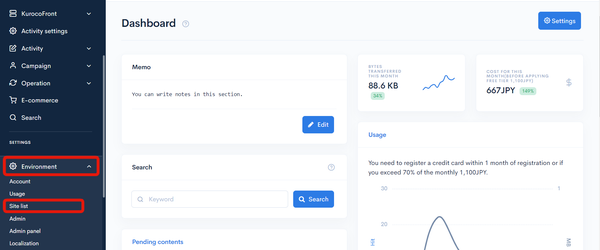
In the left sidebar menu, under "SETTINGS", click [Environment] -> [Site list].
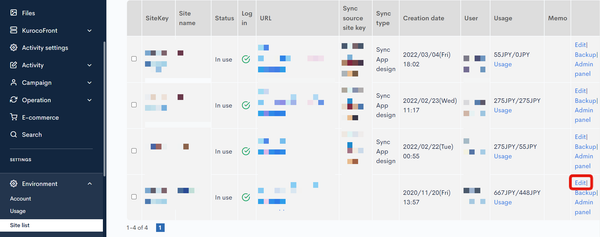
 On the site list screen, click [Edit] next to the site you want to synchronize.
 In the corresponding site editor, select the following settings for "Synchronization":
| Field | Setting |
|---|---|
| Sync immediately | Check this box. |
| Sync source site key | Select the site key of the site you want to synchronize from the dropdown list. |
| Sync App design / Full sync | Select your method of choice. See next section Sync item list for more details. |
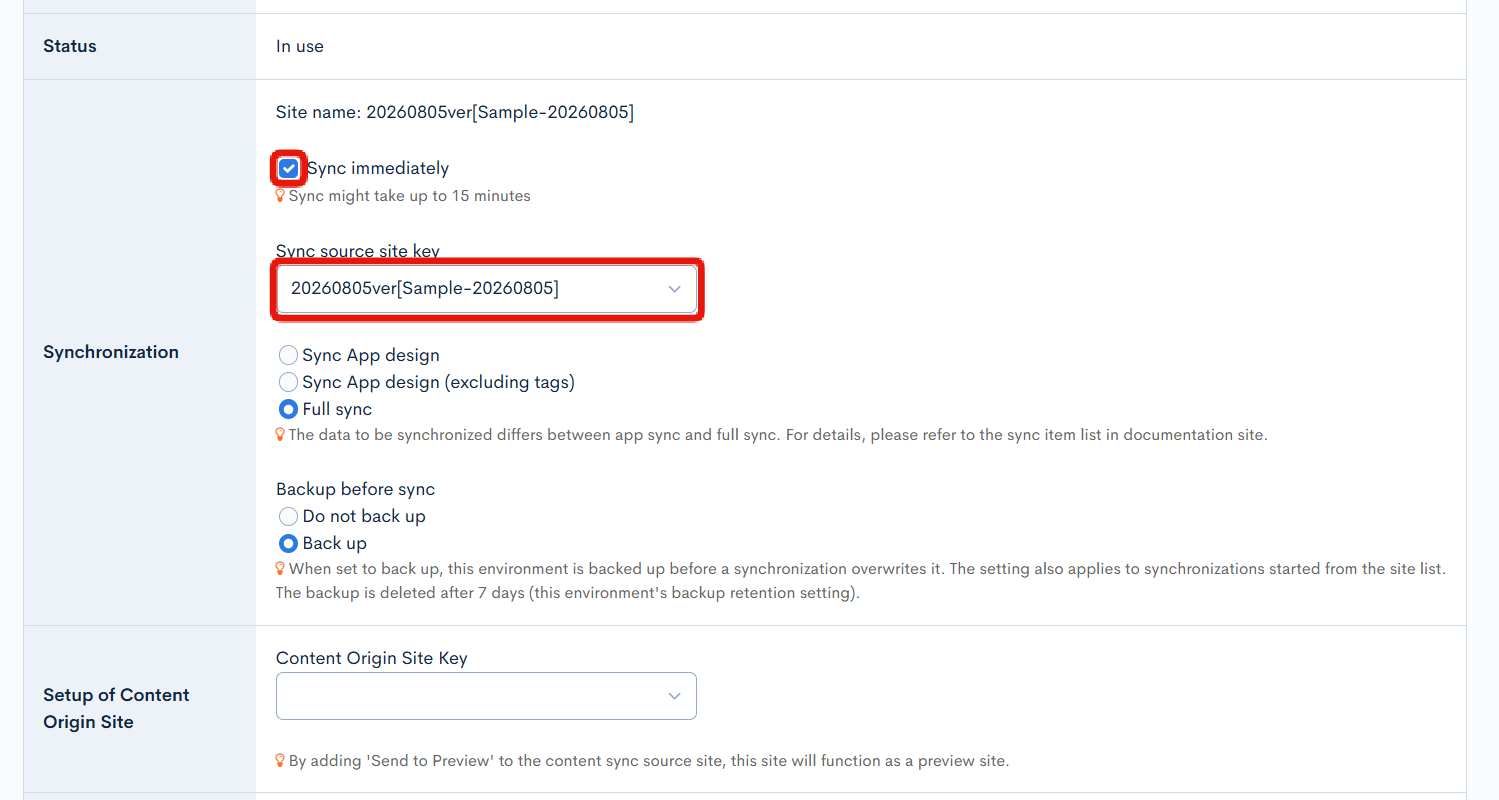
When you are done, click [Update] to save the settings. The synchronization will take about 15 minutes.
Sync item list
You can choose one of two synchronization methods:
- App sync
- Full sync
As shown in the table below, the two methods are used to sync different content types.
| Menu | Sub-menu | Item | App sync | App Sync(excluding tags) | Full sync |
|---|---|---|---|---|---|
| Content structure | - | Content structure | ✓ | ✓ | ✓ |
| Content | - | Content | ✗ | ✗ | ✓ |
| Master | ✗ | ✗ | ✓ | ||
| Tag | ✓ | *4(See note below) | ✓ | ||
| API | - | API | ✓ | ✓ | ✓ |
| Endpoint | ✓ | ✓ | ✓ | ||
| File manager | - | File | ✗ | ✗ | ✓ |
| AI | - | Vector data | ✓ | ✓ | ✓ |
| AI dictionary | ✗ | ✗ | ✓ | ||
| AI Agent | ✗ | ✗ | ✓ | ||
| Activity | - | Activity structure | ✗ | ✗ | ✓ |
| Activity | ✗ | ✗ | ✓ | ||
| Favorite | ✗ | ✗ | ✓ | ||
| Channels | WEB | KurocoFront Settings | ✗ | ✗ | ✗ |
| Form | ✓ | ✓ | ✓ | ||
| Inquiry data | ✗ | ✗ | ✓ | ||
| Web spiders | ✓ | ✓ | ✓ | ||
| SendGrid | ✗ | ✗ | ✗ | ||
| Amazon SES | ✗ | ✗ | ✗ | ||
| SMTP | ✗ | ✗ | ✗ | ||
| Messaging | Slack | ✗ | ✗ | ✗ | |
| Microsoft Teams | ✗ | ✗ | ✗ | ||
| LINE | ✗ | ✗ | ✗ | ||
| Text (SMS) | ✗ | ✗ | ✗ | ||
| X | ✗ | ✗ | ✗ | ||
| - | Bulk Delivery | ✓ | ✓ | ✓ | |
| Delivery data | ✗ | ✗ | ✓ | ||
| Member | - | Member | ✗ | ✗ | ✓ |
| Group | ✓ | ✓ | ✓ | ||
| Custom member filter | ✓ | ✓ | ✓ | ||
| Temporary member | ✗ | ✗ | ✓ | ||
| Auto login tokens | ✗ | ✗ | ✓ | ||
| Operation | - | Message template | ✓ | ✓ | ✓ |
| Log management | ✗ | ✗ | *1(See note below) | ||
| Batch process | ✓ | ✓ | ✓ | ||
| Batch template | ✓ | ✓ | ✓ | ||
| Custom function | ✓ | ✓ | ✓ | ||
| Approval workflow | ✗ | ✗ | ✓ | ||
| Data schema | ✗ | ✗ | ✓ | ||
| E-commerce | - | Product | ✗ | ✗ | ✓ |
| Order | ✗ | ✗ | ✓ | ||
| Settings | ✗ | ✗ | ✓ | ||
| Environment | - | Account settings | ✗ | ✗ | ✗ |
| Billing | ✗ | ✗ | ✗ | ||
| Usage | ✗ | ✗ | ✗ | ||
| Site list | ✗ | ✗ | ✗ | ||
| Custom domain/TLS certificate | ✗ | ✗ | ✗ | ||
| Admin panel | Admin panel | *2(See note below) | *2(See note below) | *3(See note below) | |
| Dashboard widget | ✗ | ✗ | ✓ | ||
| Admin panel plugin | ✓ | ✓ | ✓ | ||
| WYSIWYG Templates | ✗ | ✗ | ✓ | ||
| - | Localization | ✗ | ✗ | ✓ | |
| Constant | ✗ | ✗ | ✓ | ||
| Secret | ✗ | ✗ | ✗ | ||
| Backup | ✗ | ✗ | ✗ | ||
| Site settings | ✓ | ✓ | ✓ | ||
| External system integration | - | GitHub | ✗ | ✗ | ✗ |
| Identity federation | SAML IdP | ✗ | ✗ | ✓ | |
| SAML SP | ✗ | ✗ | ✓ | ||
| OAuth SP | ✓ | ✓ | ✓ | ||
| OAuth Authorization Server | ✗ | ✗ | ✓ | ||
| IDaaS SP | ✗ | ✗ | ✓ | ||
| SCIM SP | ✗ | ✗ | ✓ | ||
| - | Google Search Console | ✗ | ✗ | ✗ | |
| Firebase | ✗ | ✗ | ✗ | ||
| Amazon S3 | ✗ | ✗ | ✗ | ||
| Vimeo | ✗ | ✗ | ✗ | ||
| reCAPTCHA | ✓ | ✓ | ✓ | ||
| Google Analytics | ✓ | ✓ | ✓ | ||
| VAddy | ✓ | ✓ | ✓ | ||
| Stripe | ✗ | ✗ | ✗ |
*1Note: Log management aggregate data only.
*2Note: Only the following admin panel fields will be synchronized under the app sync method:
- Login screen text
- Auto-login validity period
*3Note: Only the following admin panel fields will be synchronized under the full sync method:
- Login screen text
- Auto-login validity period
- Maximum number of content structure items
- Maximum number of loop of content structure items
- Number of categories that can be set for contents
- Maximum number of member fields
*4Note: Tags will not be synchronized, but tag categories will be.
Related documents
Support
If you have any other questions, please contact us or check out Our Slack Community.