Slots available for admin panel plugins
This document lists all the slots available for admin panel plugins in Kuroco.
Admin panel plugin settings
When configuring admin panel plugins, you must include the following information to specify where and under what conditions the plugins will be placed:
- Slot
- Slot parameters
Slot
A slot is a location identifier for plugins. Provide both the target page URL and the slot to specify where a plugin will be inserted on the page.
Slot parameter
The slot parameter indicates the display conditions of a plugin. For example, you may want to insert a plugin only for pages that match a specific ID. Different parameters are available depending on the slot.
List of slots for Vue.js plugins
Below is a list of slots that can be used for Vue plugins, along with information on their functions, settings, and props (if available).
For more information on how to configure Vue plugins, see Tutorial: Apply any Vue component to the Kuroco management screen using the management screen plugin.
Universal plugin settings
The settings below apply to all target slots. For this reason, they have been omitted from the slot descriptions.
Source - URL
| Parent | Child | Purpose | Description | Example |
|---|---|---|---|---|
| Source | URL | URL location of bundle files | Specify the path of the directory containing manifest.json.(Note: You can use any path, but it must match the one under publicPath in rcms-js.config.js.) |
|
Props
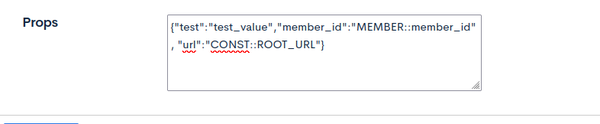
You can specify any component-specific props:
| Property type | Sample | Description |
|---|---|---|
| Static | "test": "test_value" | Any JSON-valid value |
| Member info | "member_id": "MEMBER::member_id" | Logged in member info. Format: MEMBER::field_name. Next fields are available:
|
| Predefined constants | "url": "CONST::ROOT_URL" | Any constant defined at the "Enviroment" -> "Constants" page. Format: CONST::constant_name. |
Common slot parameters
The following slot parameter is available for all Vue plugin slots and is described here once. It does not appear again in the individual slot descriptions below.
| Parameter | Value | Description | Example |
|---|---|---|---|
| group_id |
G is the member group ID | Display the plugin only to members belonging to the specified group |
|
| group_id[not] |
G is the member group ID to exclude | Hide the plugin from members belonging to the specified group |
|
If group_id is not set, the plugin is displayed to all logged-in users.
You can combine group_id with slot-specific parameters. For example, to show a plugin on Content Structure ID 1 only to members in Group 2: topics_group_id=1&group_id=2
Common to screens
Slot available on admin panel screens that display the header.
Top of the page (no slot name)
When the slot name is left blank, the component is inserted directly below the page header (above the main content) of the target page, without replacing any screen element.

Plugin settings
| Parent | Child | Value | Description | Example |
|---|---|---|---|---|
| Source | Component name | Component name (any value) | PageScript | |
| Manifest key | vendors.*;{ComponentName}.* | vendors.*;PageScript.* | ||
| Target | Page URI | Any URI | Path of the page where the component is inserted |
|
| Slot name | (blank) |
Slot parameters
| Parameter | Value | Description | Example |
|---|---|---|---|
| topics_group_id | topics_group_id={G}, where {G} is the content structure ID | Content structure ID on which the plugin is displayed Effective on screens that have a content structure ID (content list, content editor, etc.). On screens without a content structure ID, this parameter is ignored and the plugin is displayed. | topics_group_id=1 |
| inquiry_id | inquiry_id={I}, where {I} is the form ID | Form ID on which the plugin is displayed Effective on screens that have a form ID (submissions list, etc.). On screens without a form ID, this parameter is ignored and the plugin is displayed. | inquiry_id=1 |
topics_group_id / inquiry_id are not applied as display conditions on screens that do not have the corresponding ID. For example, if you set the Page URI to / and the slot parameter to topics_group_id=1, the plugin is displayed on the content screens of content structure ID 1 and also on screens without a content structure ID, such as the dashboard and the member list.
To display the plugin only on screens of a specific content structure or form, also narrow the Page URI to the path of the target screen (e.g., /topics/topics_list/).
Props
No screen-specific props are passed. You can use the values set in Props.
Content module
Available slots in the Content module
Content structure - Additional fields
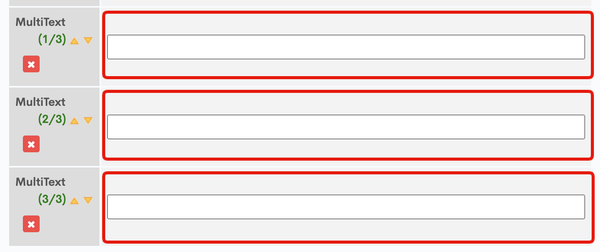
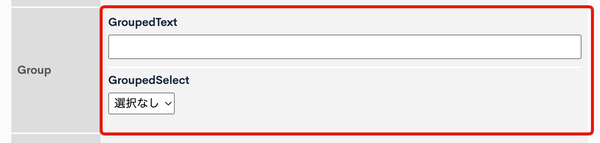
Any additional field on the content editor screen

All repetitions of an additional field (if it has been set to be repeated)
All (sub-)fields within a grouped field
Plugin settings
| Parent | Child | Value | Description | Example |
|---|---|---|---|---|
| Source | Component name | Component name (optional value) | ContentTextInput | |
| Manifest key | vendors.\*;{ComponentName}.\* | vendors.\*;ContentTextInput.\* | ||
| Target | Page URI | /topics/topics_edit/ | ||
| Slot name | ext_{N}.ext_{M}, where {N} is the parent field, and {M} is the name of the child field. | Name of the additional field to be replaced by the plugin. If the whole field group is to be replaced, use ext_{N}. | ext_1 ext_1.ext_1 ext_1.ext_2 |
Slot parameters
| Parameter | Value | Description | Example |
|---|---|---|---|
| topics_group_id | topics_group_id={G}, where {G} is the topic group ID (content structure ID) | Content structure ID to be replaced by the plugin | topics_group_id=1 |
Props
There are 2 types of props for Vue component. Next values will be propagated to the component by default:
| Name | Type | Description |
|---|---|---|
| topics_group_id | Number | Topic group ID (content structure ID) |
| extConfig | Array | Array containing the additional field settings as objects (for the number of repetitions)
|
Source examples
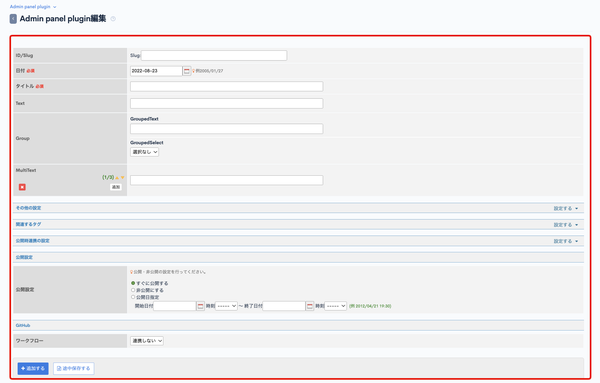
Content editor
Any field on the content editor screen
Plugin settings
| Parent | Child | Value | Description | Example |
|---|---|---|---|---|
| Source | Component name | Component name (optional value) | ContentEditForm | |
| Manifest key | vendors.\*;{ComponentName}.\* | vendors.\*;ContentEditForm.\* | ||
| Target | Page URI | /topics/topics_edit/ | URL of the content editor page | |
| Slot name | edit_form |
Slot parameters
| Parameter | Value | Description | Example |
|---|---|---|---|
| topics_group_id | topics_group_id={G}, where {G} is the topic group ID (content structure ID) | Content structure ID to be replaced by the plugin | topics_group_id=1 |
Props
| Name | Type | Description |
|---|---|---|
| topics_id | Number | Content ID (topic ID) |
| topics_group_id | Number | Topic group ID (content structure ID) |
| ext_items | Array | Additional field structure |
| formData | Object | Input data |
| DG_CODE | String | CSRF token |
| categoryCount | Number | Number of content categories |
| categoryOptions | Object | Content category options |
| topicsFlagOptions | Object | Other settings - "Show in list" options |
| regularFlagOptions | Object | Other settings - "Display on top" options |
| memberGroupOptions | Object | Other settings - "access authorization" options |
| relatedTags | Object | Related tags |
| notifOptions | Object | Publishing integration settings - "Sync notifications" options |
| githubWorkflowOptions | Object | GitHub Workflow options |
Content list
Any entry in the content list
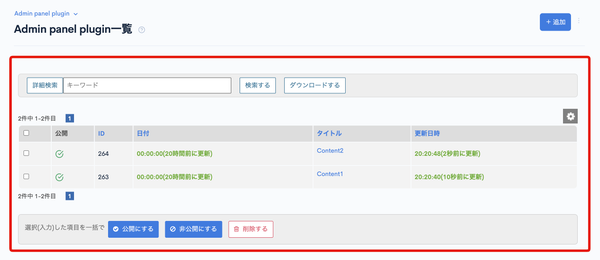
If a plugin with the slot name topics_list exists, it will no longer load <div class="header">.
Plugin settings
| Parent | Child | Value | Description | Example |
|---|---|---|---|---|
| Source | Component name | TopicsList | Component name (optional value) | |
| Manifest key | vendors.\*;TopicsList.\* | |||
| Target | Page URI | /topics/topics_list/ | URL of the content list page | |
| Slot name | topics_list |
Slot parameters
| Parameter | Value | Description | Example |
|---|---|---|---|
| topics_group_id | topics_group_id={G}, where {G} is the topic group ID (content structure ID) | Content structure ID to be replaced by the plugin | topics_group_id=1 |
Props
| Name | Type | Description |
|---|---|---|
| topics_group_id | Number | Topic group ID (content structure ID) |
Form module
Available slots in the Form module
Form editor - [Report] tab
Insert new component on the report screen
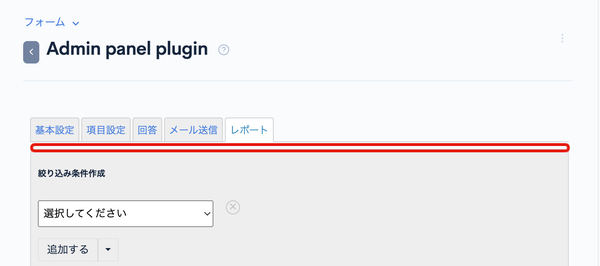
Plugin settings
| Parent | Child | Value | Description | Example |
|---|---|---|---|---|
| Source | Component name | TopicsList | Component name (optional value) | InquiryListTop |
| Manifest key | vendors.\*;{ComponentName}.\* | vendors.\*;InquiryListTop.\* | ||
| Target | Page URI | /inquiry/inquiry_report/ | ||
| Slot name | list_main_top |
Slot parameters
| Parameter | Value | Description | Example |
|---|---|---|---|
| inquiry_id | inquiry_id={I}, where {I} is the form ID | Form (inquiry) ID to filter the plugin display | inquiry_id=1 |
Form editor - [Submissions] tab (top)
Insert new component at the top of the Submissions screen
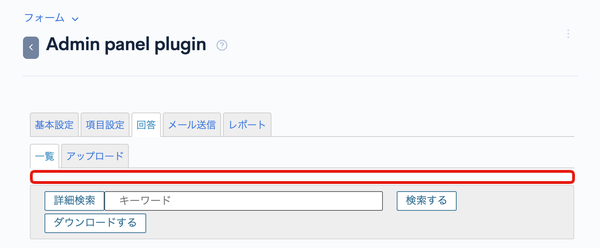
Plugin settings
| Parent | Child | Value | Description | Example |
|---|---|---|---|---|
| Source | Component name | Component name (optional value) | InquiryListTop | |
| Manifest key | vendors.\*;{ComponentName}.\* | vendors.\*;InquiryListTop.\* | ||
| Target | Page URI | /inquiry/inquiry_bn_list/ | ||
| Slot name | list_main_top |
Slot parameters
| Parameter | Value | Description | Example |
|---|---|---|---|
| inquiry_id | inquiry_id={I}, where {I} is the form ID | Form (inquiry) ID to filter the plugin display | inquiry_id=1 |
Form editor - [Submissions] tab (list)
Any entry on the Submissions screen
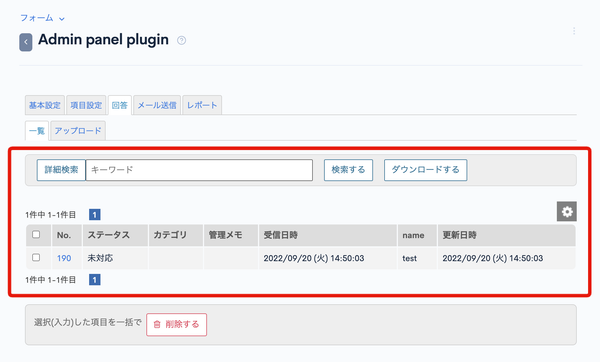
Plugin settings
| Parent | Child | Value | Description | Example |
|---|---|---|---|---|
| Source | Component name | InquiryBnList | Vue component name (optional value) | |
| Manifest key | vendors.\*;InquiryBnList.\* | |||
| Target | Page URI | /inquiry/inquiry_bn_list/ | URL of the submissions list page | |
| Slot name | inquiry_bn_list |
Slot parameters
| Parameter | Value | Description | Example |
|---|---|---|---|
| inquiry_id | inquiry_id={I}, where {I} is the form ID | Form (inquiry) ID to filter the plugin display | inquiry_id=1 |
Member module
Available slots in the Member module
Member editor
Any additional field on the member editor screen

Plugin settings
| Parent | Child | Value | Description | Example |
|---|---|---|---|---|
| Source | Component name | Component name (optional value) | MemberTextInput | |
| Manifest key | vendors.\*;{ComponentName}.\* | vendors.\*;MemberTextInput.\* | ||
| Target | Page URI | /member/member_edit/ | URL of the member editor page | |
| Slot name | Identifier of the target additional field | Variable name defined in the additional field settings | ext_text |
Props
| Name | Type | Description |
|---|---|---|
| value | any | Input value |
| extConfig | Object | Additional field structure |
| member_id | Number | Target member ID |
| group_ids | Array | All Group IDs that the target member belongs to |
List of slots for CSS plugins
Below is a list of slots available for CSS plugins, along with information on their functions, settings, and props (if available).
For more information on how to configure CSS plugins, see Tutorial: Apply CSS to a Kuroco management screen with the plugin.
<head> tag
Plugin settings
| Parent | Child | Value | Description | Example |
|---|---|---|---|---|
| Source | URL | URL of the CSS file |
| |
| Target | Page URI | Optional URI | Path of the page using the CSS | |
| Slot name | head |
Slot parameters
| Parameter | Value | Description | Example |
|---|---|---|---|
| topics_group_id | topics_group_id={G}, where {G} is the topic group ID (content structure ID) | Content structure ID to be replaced by the plugin | topics_group_id=1 |
| Parameter | Value | Description | Example |
|---|---|---|---|
| group_id |
G is the target group ID | Apply the CSS to all users belonging to the specified group |
|
| group_id[not] |
G is the target group ID to be excluded | Apply the CSS to all users who do not belong to the specified group |
|
Related documents
- Admin panel plugin
- Adding Vue components to the content editing screen using plugins
- Apply CSS to a Kuroco management screen with the plugin
- Adding a Custom Page to Kuroco Management using Admin panel plugin
- How Can I Send Requests to Endpoints Requiring Authentication from the Admin Panel Plugin?
- Can I Apply CSS to Multiple Pages in the Management Screen Plugin?
Support
If you have any other questions, please contact us or check out Our Slack Community.