Configuring the APIs required to build an e-commerce site
This tutorial explains step by step how to build an e-commerce site with Kuroco. Building the site involves three main tasks:
- Configuring e-commerce settings from the admin panel
- Configuring the APIs required to build an e-commerce site (this page)
- Creating the front-end
This tutorial explains how to configure the APIs required to build an e-commerce site.
Prerequisites
This tutorial assumes that purchases are made after logging in. Therefore, this page describes the API settings for login and profile retrieval in addition to the e-commerce API settings. Implementing login is not covered in this tutorial. For details, see Building a login page.
Endpoint list
The endpoints created in this tutorial are as follows.
| Item | Endpoint path | Sample Vue file |
|---|---|---|
| Login | login | - |
| Get orderer information | profile | product_list.vue purchase.vue |
| Get product list | product-list | product_list.vue |
| Add to cart | add-cart | product_list.vue |
| Get cart contents | cart-items/{ec_cart_id} | product_list.vue purchase.vue |
| Purchase products | purchase | purchase.vue |
The sample Vue files are the Vue files of the pages created later in Creating the front-end.
Creating the API
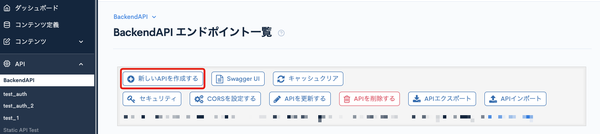
First, create an API. In this tutorial, create an API named "EC". On the API screen, click [Create new API].
Enter the following and click [Add].
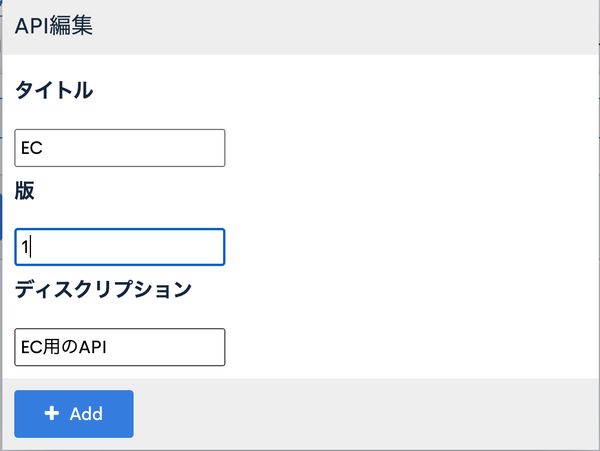
| Item | Value |
|---|---|
| Title | EC |
| Version | 1 |
| Description | API for e-commerce |
Creating endpoints
Next, create the endpoints. On the screen of the EC API you just created, click [Configure Endpoint].
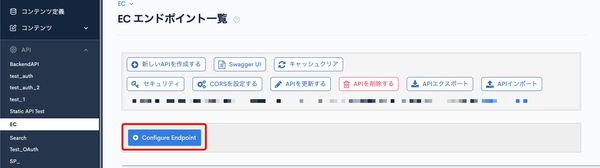 The endpoint creation screen appears.
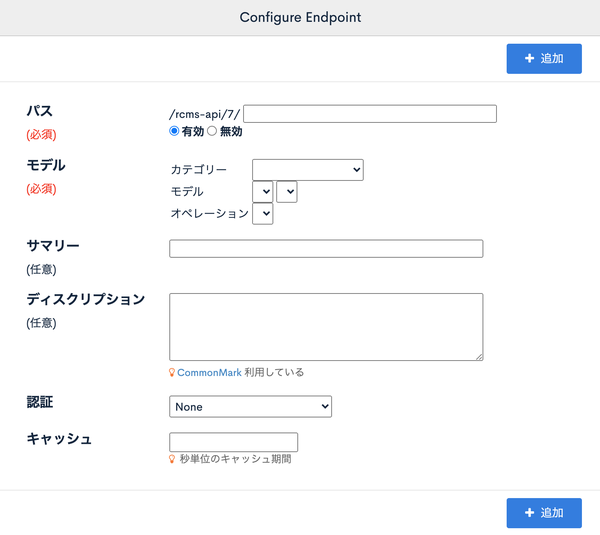 Create the following endpoints from this screen.
Login
Performs the login process.
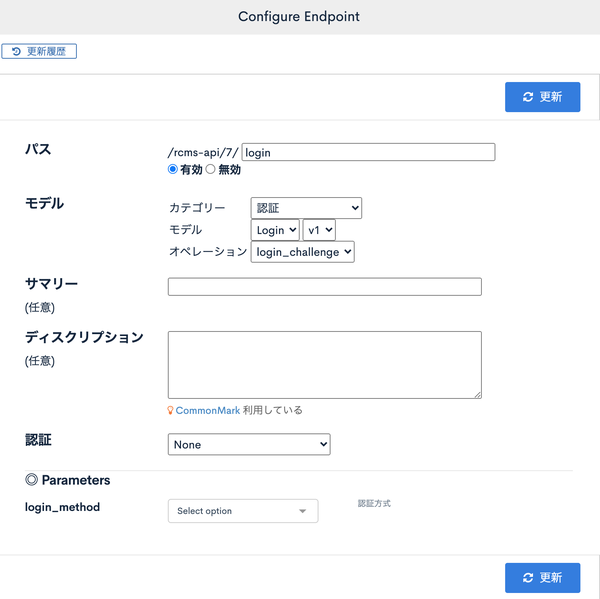
| Item | Value |
|---|---|
| Path | login |
| Category | Authentication |
| Model | Login |
| Operation | login_challenge |
Sample request
{
  "email": "test@example.co.jp",
  "password": "test_password",
  "login_save": 0
}
| Key | Description |
|---|---|
| Email address of the member logging in | |
| password | Password of the member logging in |
| login_save | Whether to keep the login state (specify 1 to keep it) |
Sample response
{
  "grant_token": "(omitted)",
  "status": 0,
  "member_id": 123,
  "info": {
    "validUntil": 1633945168
  },
  "messages": [],
  "errors": []
}
Get orderer information
Gets the cart ID and member information after login.
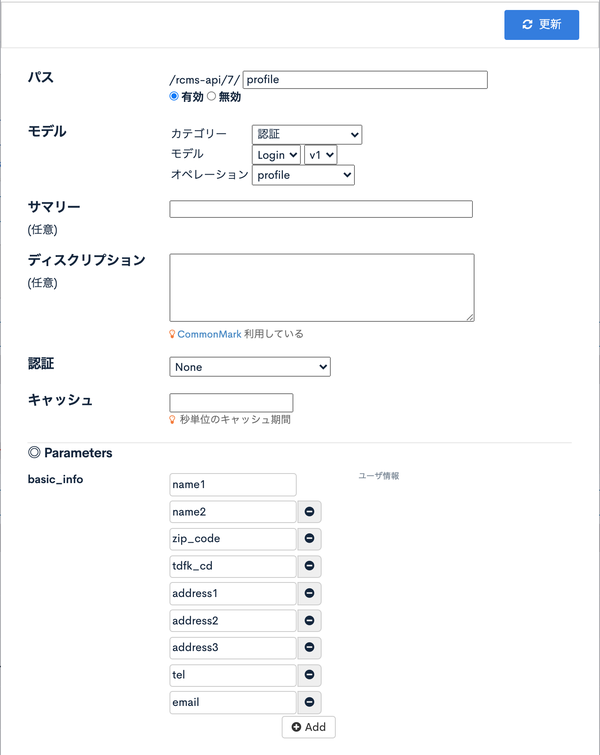
| Item | Value |
|---|---|
| Path | profile |
| Category | Authentication |
| Model | Login |
| Operation | profile |
| Parameters: basic_info | name1 name2 zip_code tdfk_cd address1 address2 address3 tel |
Sample response
{
  "name1": "Test",
  "name2": "Taro",
  "zip_code": "1234567",
  "tdfk_cd": "03",
  "address1": "Address (city)",
  "address2": "Street address",
  "address3": "Building name",
  "tel": "09022223333",
  "email": "test@example.co.jp",
  "member_id": 123,
  "group_ids": {
    "102": "Login User"
  },
  "shash": "(omitted)",
  "expiresAt": 1633945233,
  "ec_cart_id": 1000,
  "ec_point": 1,
  "ec_temp_point": 150
}
Get product list
This API retrieves product content data and product item data. It also supports searching with the filter function.
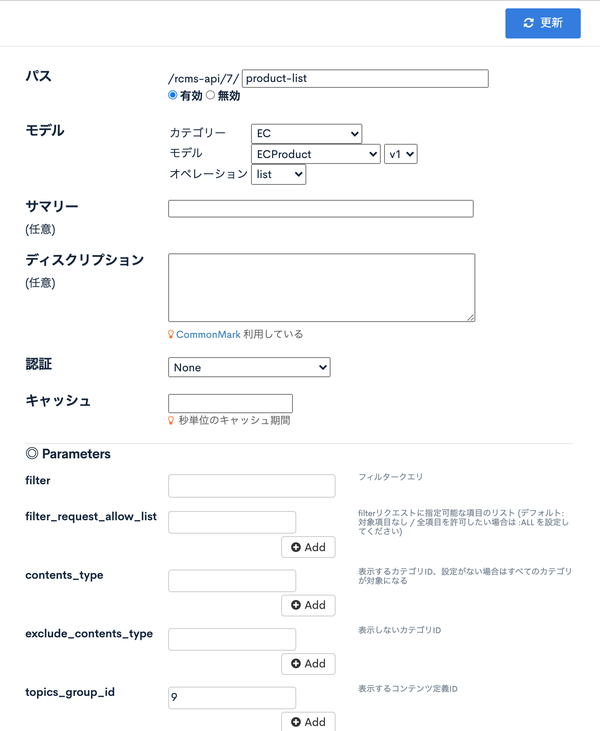
| Item | Value |
|---|---|
| Path | product-list |
| Category | EC |
| Model | ECProduct |
| Operation | list |
| Parameters: topics_group_id | (Specify the group ID of the target content structure) |
You can check the group ID of a content structure in Content structure in the Kuroco admin panel.
Sample response
  "list": [
    {
      "product_id": 41205,
      "ymd": "1970-01-01",
      "subject": "PHP Development\t- Paperback",
      "link_url": "",
      "open_flg": 1,
      "inst_ymdhi": "2020-06-19 17:42:18.033674+09",
      "update_ymdhi": "2020-11-04 20:48:26.468659+09",
      "product_group_id": 11,
      "ext_col_01": "",
      "topics_id": 7,
      "combination_id": 235,
      "stock": 3978,
      "stock_unlimited": 0,
      "sale_limit": 0,
      "sale_unlimited": 1,
      "price_01": "0",
      "price_02": "2500",
      "set_product_ids": "",
      "release_ymdhi": null,
      "delivery_type": 255,
      ...omitted...
      "product_data": {
        "topics_id": 7,
        "season": 2016,
        "ymd": 0,
        "contents_type": 6,
        "contents": "<img class=\"img-responsive\" src=\"/files/user/201512070955_1.jpg\"><br/>\r\n<br/>\r\nThe layout changes when the screen size is reduced.",
        "subject": "PHP Development",
        "topics_flg": 1,
        "open_flg": 1,
        "regular_flg": 0,
        "inst_ymdhi": "2016-06-09T12:28:31+09:00",
        "update_ymdhi": "2020-06-19T17:09:39+09:00",
        "topics_group_id": 5,
        "ext_col_01": "",
        ...omitted...
      },
      "combination_name": "Paperback",
      "class_options": {
        "16": {
          "ec_class_id": 16,
          "ec_class_option_id": 44,
          "label_nm": "Paperback"
        }
      },
      "order_list": []
Add to cart
Adds a product to the cart with the specified cart ID.
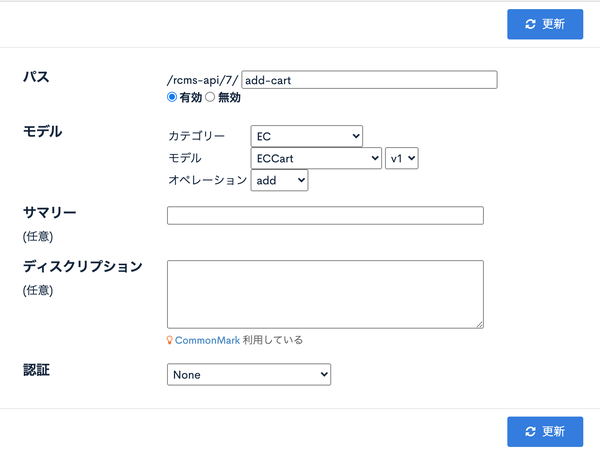
| Item | Value |
|---|---|
| Path | add-cart |
| Category | EC |
| Model | ECCart |
| Operation | add |
Sample request
{
  "ec_cart_id": 1000,
  "item": {
    "product_id": 41205,
    "quantity": 1
  }
}
| Key | Description |
|---|---|
| ec_cart_id | Cart ID |
| item.product_id | Product item ID |
| item.quantity | Quantity |
Sample response
{
  "messages": [
    "新規追加しました。"
  ],
  "errors": []
}
Get cart contents
Gets the current contents of the cart.
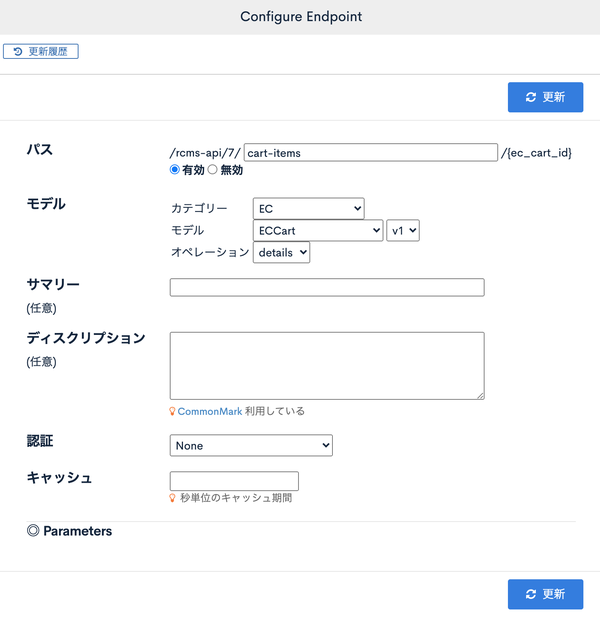
| Item | Value |
|---|---|
| Path | cart-items/{ec_cart_id} |
| Category | EC |
| Model | ECCart |
| Operation | details |
Sample response
{
  "messages": [],
  "errors": [],
  "details": {
    "ec_cart_id": 1000,
    "items": [
      {
        "product_id": 41205,
        "quantity": 1
      }
    ],
    "subtotal": 2500,
    "deliv_fee": 200,
    "total": 2700,
    "total_quantity": 1
  },
  "payment_list": {
    "59": {
      "payment_type": "Bank transfer",
      "payment_method": 4,
      "use_link_type": false,
      "use_token": false
    }
  }
}
payment_list contains the payment methods that can be used in common by all product items in the cart.
Purchase products
This API purchases the products in the cart. Sample requests and notes for each payment method are described below.
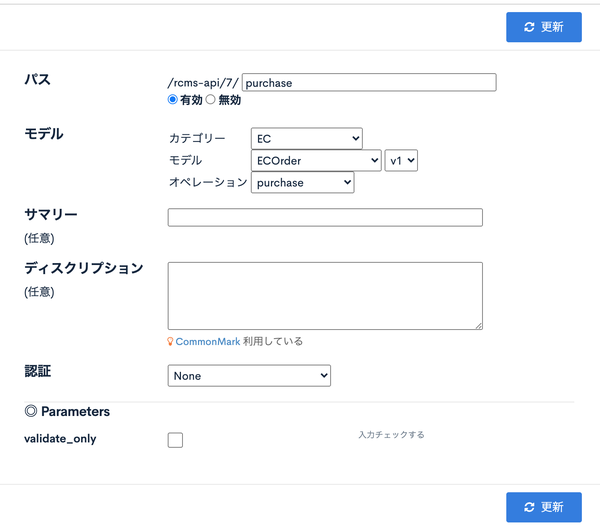
| Item | Value |
|---|---|
| Path | purchase |
| Category | EC |
| Model | ECOrder |
| Operation | purchase |
Sample request
{
  "ec_cart_id": 0,
  "order_products": {},
  "product_id": 0,
  "quantity": 0,
  "ec_payment_id": 1,
  "discount": {
    "point": 0,
    "serial_code": "string"
  },
  "shipping_address": {
    "name1": "",
    "name2": "",
    "zip_code": "000",
    "tdfk_cd": "",
    "address1": "",
    "address2": "",
    "address3": "",
    "tel": ""
  },
  "sp_career_info": {
    "sp_career": 1,
    "open_id": "string",
    "return_url": "string",
    "cancel_url": "string",
    "other_url": "string",
    "outline": "string"
  },
  "orderer": {
    "name1": "string",
    "name2": "string",
    "zip_code": "000",
    "tdfk_cd": "01",
    "address1": "string",
    "address2": "string",
    "address3": "string",
    "tel": "string",
    "email": "email@example.com"
  },
  "card_token": "string",
  "order_note": "string",
  "validate_only": false
}
| Key | Description |
|---|---|
| ec_cart_id | Cart ID If logged in, you can get it from the profile API. If not logged in, specify 0. |
| order_products | Used to specify the products to purchase directly in the API request without using the cart (*) |
| product_id | Used to specify the products to purchase directly in the API request without using the cart (*) |
| quantity | Used to specify the products to purchase directly in the API request without using the cart (*) |
| ec_payment_id | Specify the payment method ID.Typically, you get the "sales method" linked to the product and specify the ID of the payment method selected from it. |
| shipping_address | Shipping address If logged in and not specified, the logged-in user's information is used. |
| orderer | Orderer information If logged in and not specified, the logged-in user's information is used. |
| order_note | Order note |
| validate_only | Set to true if you only want to validate the input without actually processing the payment and purchase. |
This completes the API creation.
For details on the endpoint settings, see Endpoint settings.
Next, create the front-end. See Creating the front-end.
Related documents
Support
If you have any other questions, please contact us or check out Our Slack Community.