SendGrid
The SendGrid screen enables you to set up a SendGrid-integrated admin e-mail account.
Accessing the screen
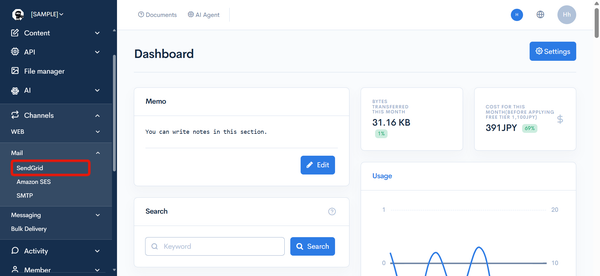
In the left sidebar menu, under "SETTINGS", click [Channels] -> [Mail] -> [SendGrid].
Item descriptions

| Item/Button | Description |
|---|---|
| Site e-mail address | Enter the admin e-mail address to be used. (Note: This address must be registered in the list of allowed domains/e-mails.) |
| SendGrid | When you check [Use original], you can configure the following: ・SendGrid API Key: Enter the API key issued by SendGrid. ・Authorized domain/e-mail address: Enter, one per line, the domains or e-mail addresses allowed to be used as the sender. Entering a domain for which you have completed Sender Authentication on the SendGrid side allows you to send e-mail using that domain as the sender. |
| Webhook URL | This URL is used to configure SendGrid's Event Webhook. |
| Update | Click to apply the changes you made on this screen. |
caution
Even if you have a contract or connection with SendGrid, Kuroco's email sending charges will continue to apply.
Related documents
Support
If you have any other questions, please contact us or check out Our Slack Community.