How do I include content from the original form submission in the thank-you e-mail?
To include content from the original form submission in the thank-you e-mail, modify the "Thank you e-mail - Content" field in Form - Basic settings.
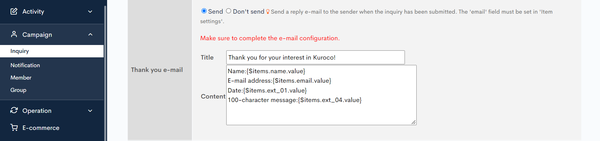 You can use one of the following methods.
A. Without foreach
Title:{$items.enter ID here.value}
Sample code:
Name: {$items.name.value}
E-mail address: {$items.email.value}
Date: {$items.ext_01.value} *where [ext_01] contains the date
Message (100 characters): {$items.ext_04.value} *where [ext_04] contains the message body
B. With foreach
Sample code:
{foreach from=$items key=key item=item}
{if $key == 'name'}
【{$item.title}】{$item.value}
{/if}
{/foreach}
More information
For more information on customizing e-mail notifications, see:
- FAQ: Can I customize my thank-you e-mails?
- FAQ: How do I include user details in the thank-you e-mail?
- FAQ: How do I link content information in a thank-you email?
- FAQ: How do I display inquiry numbers in thank-you e-mails and notifications?
- FAQ: Can I modify the content of the notification e-mail for each form?
- Reference: List of available variables in the Message template
- FAQ: Can I change the recipient email address based on the options selected in the form items?
Related documents
Support
If you have any other questions, please contact us or check out Our Slack Community.