How do I auto-convert iframes with Kuroco?
Typically, <oembed> tags in Wysiwyg editors (CKEditor, etc.) must be implemented on the front-end to be converted into the appropriate iframe tags for Iframely.
However, Kuroco enables you to auto-convert <oembed> tags into iframes. Using this function, you can easily display external media content inserted in your Wysiwyg editor.
Kuroco settings
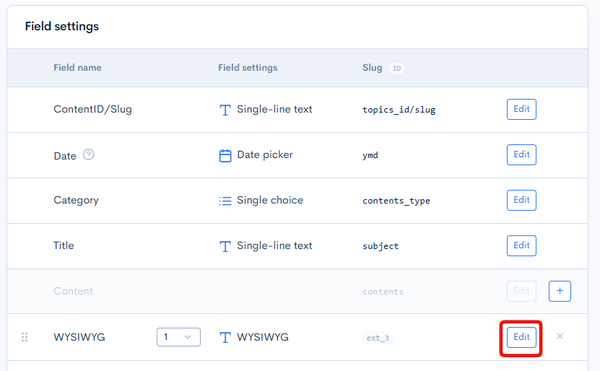
Open the target content structure editor. In the additional fields section, select the the WYSIWYG field you want to insert your tags in and click [Edit].
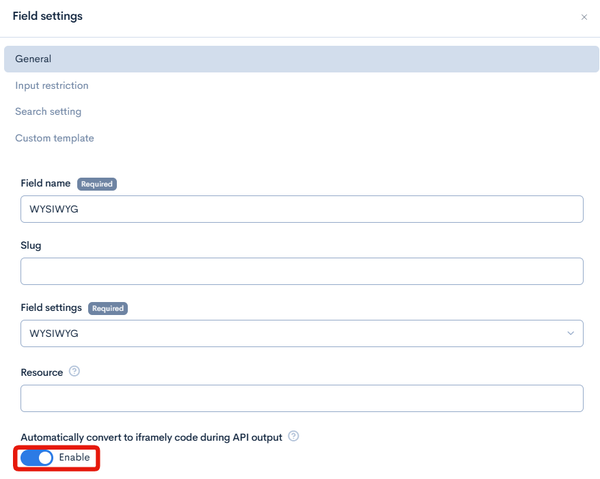
In the Field settings dialog, enable "Automatically convert to iframely code during API output" and click [Save].
Front-end settings
Load the following script on the target page:
<script async charset="utf-8" src="https://iframely.kuroco-front.app/embed.js?cancel=0" ></script>
For Nuxt.js, use the code below to verify the page display:
<template>
  <div v-if="response">
    <h1 class="title">{{ response.details.subject }}</h1>
    <!-- eslint-disable-next-line vue/no-v-html -->
    <div class="post" v-html="response.details.ext_01"></div>
  </div>
</template>

<script>
export default {
  async asyncData({ $axios, params }) {
    return {
      response: await $axios.$get(
        `/rcms-api/26/test/253`
      ),
    }
  },
  data() {
    return {
      response: null,
    }
  },
  head() {
    return {
      script: [
        {
          async: true,
          charset: 'utf-8',
          src: 'https://iframely.kuroco-front.app/embed.js?cancel=0',
        },
      ],
    }
  },
}
</script>

<style>
.post figure.media {
  display: block;
}
</style>
Be sure to substitute /rcms-api/26/test/253 above with your own endpoint URL, and adjust the style portion of the code based on your environment.
Fees
Requests to https://iframely.kuroco-front.app/api/iframe are billed at the same rate as cached API requests ($0.37 / 10,000 hits).
All requests made from the Kuroco admin panel are free of charge.
Related documents
Support
If you have any other questions, please contact us or check out Our Slack Community.