Default group settings
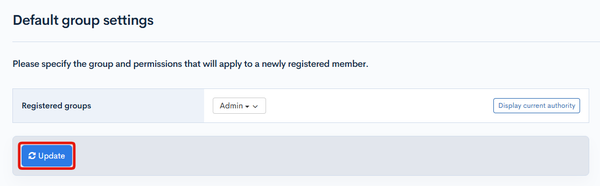
The default group settings screen configures the default groups for new members.
Accessing the screen
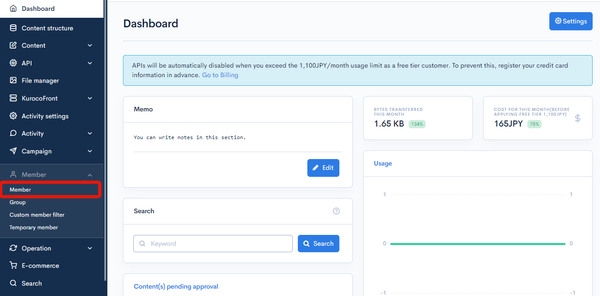
In the left sidebar menu, click [Member] -> [Member].
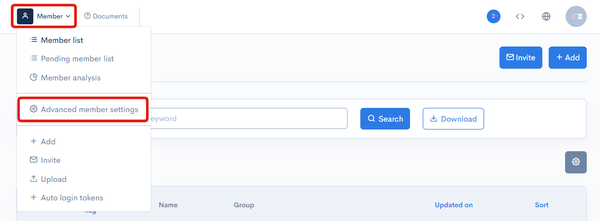
On the member list screen, click the [Member] link above the page title and select [Advanced member settings] in the dropdown menu.
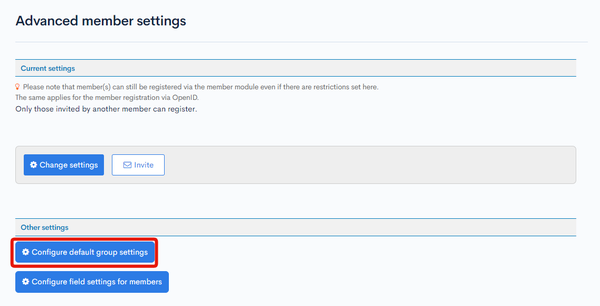
On the advanced member settings screen, click [Configure default group settings].
Item descriptions
| Item | Description |
|---|---|
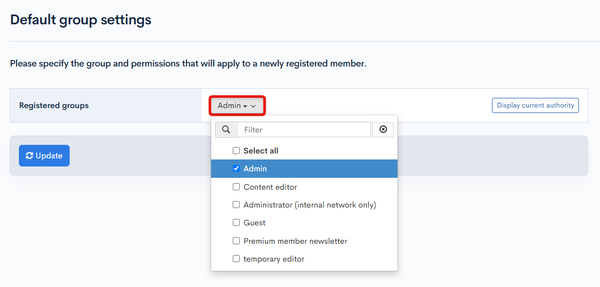
| Registered groups | Select the default group(s) for new members using the dropdown list. If you select a group with super-user privileges, the setting can be saved but a warning is displayed. |
| Display current authority | Click to view the permissions available to the selected group(s). |
Whether from the admin panel or via the API, when a member without group update permission adds a new member, the default groups are assigned automatically.
In this case, if the default groups include a group with super-user privileges, adding the new member returns an error.
Click [Update] to apply the group settings above as the default.
Related documents
Support
If you have any other questions, please contact us or check out Our Slack Community.