Product settings
In Product settings, you can view and edit product settings such as the selling price and stock.
Accessing the screen
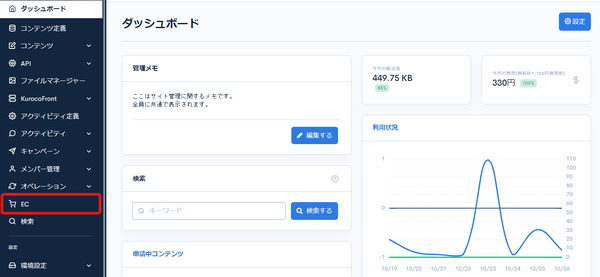
Click [EC].
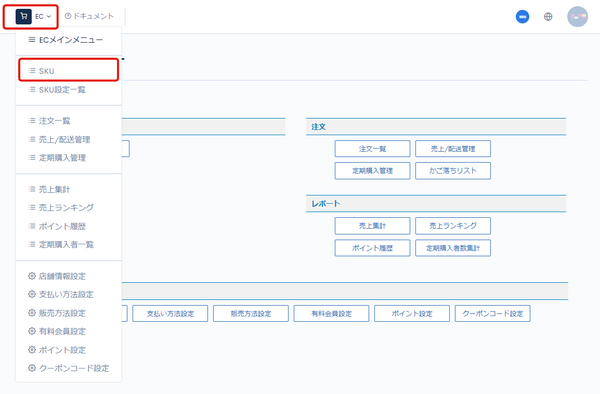
 In the E-commerce main menu, click [EC], and then click [SKU] in the dropdown.
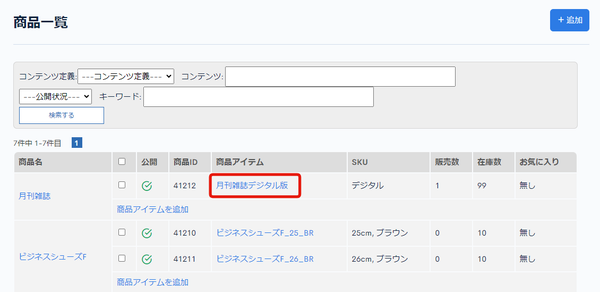
 On the product list page, click the product item you want to view.
Field descriptions
| Field | Description |
|---|---|
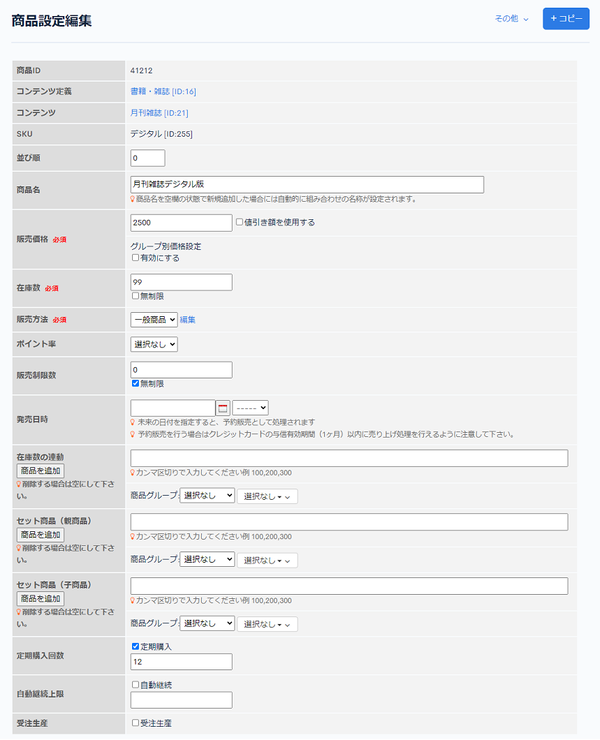
| Product ID | Displays the product ID. |
| Content structure | Displays the content structure the product belongs to. |
| Content | Displays the content the product belongs to. |
| SKU | Displays the SKU. |
| Sort order | Enter the sort order. Items are sorted in descending order of the number. |
| Product name | Enter the product name. |
| Selling price | Enter the selling price. If you check "Use discount price", you can manage the price before discount separately from the actual selling price. If you enable "Price by group setting", the selling price can change depending on the groups the buyer belongs to. |
| Stock | Enter the stock quantity. For products without stock, such as paid membership products, check "Unlimited". |
| Sales method | Set the sales method. |
| Point rate | Select the point rate. |
| Sales limit | Limits the quantity that can be added to the cart at one time. (Multiple items can be purchased by purchasing repeatedly.) |
| Release date and time | The release date and time of the product. Products purchased together are split into separate orders if this date differs. Download products become downloadable after this date. |
| Linked stock | Increases or decreases the stock of the specified products as well when a purchase or cancellation occurs. |
| Set product (parent) | If the product being edited is a child product, this shows the product specified as its parent. |
| Set product (child) | If the product being edited is a parent product, this shows the products specified as its children. |
| Recurring order count | For products subject to recurring orders, check "Regular" and specify the number of times. |
| Auto pay Limit | For automatic recurring billing, check auto-renewal and specify the number of times. If there is no particular limit, specify a sufficiently large number. |
| Made-to-order | Check this for made-to-order products. Made-to-order products cannot be purchased together with other products. You can also filter orders for made-to-order products on screens such as Sales/delivery management. |
| Extended | Displays the extension fields configured in SKU settings. |
Publish settings
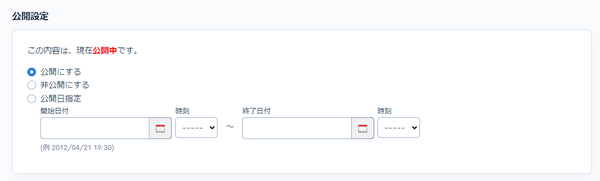
| Field | Description |
|---|---|
| Publish | Publishes the product. |
| Unpublish | Unpublishes the product. |
| Scheduled publish | Publishes the product for the start and end dates you specify. |
Update and Delete buttons, update comment
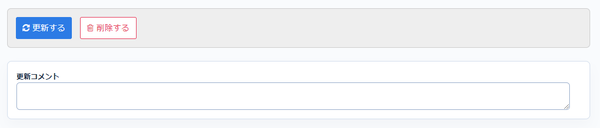
| Field | Description |
|---|---|
| Update | Applies the changes to the product settings. |
| Delete | Deletes the displayed product settings. |
| Previous update's comment | Displays the comment from the previous update of the product settings. |
| Update comment | You can leave a comment when updating the product settings. |
Related documents
Support
If you have any other questions, please contact us or check out Our Slack Community.