Order list
In the order list, you can view the order information for products.
Accessing the screen
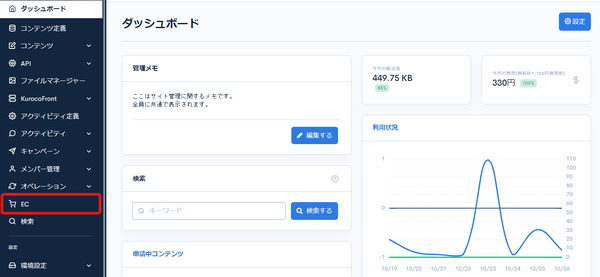
Click [EC].
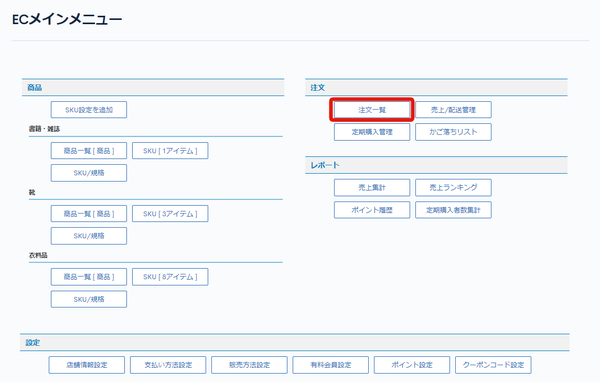
 In the E-commerce main menu, click [Order list].
Field descriptions
Search criteria
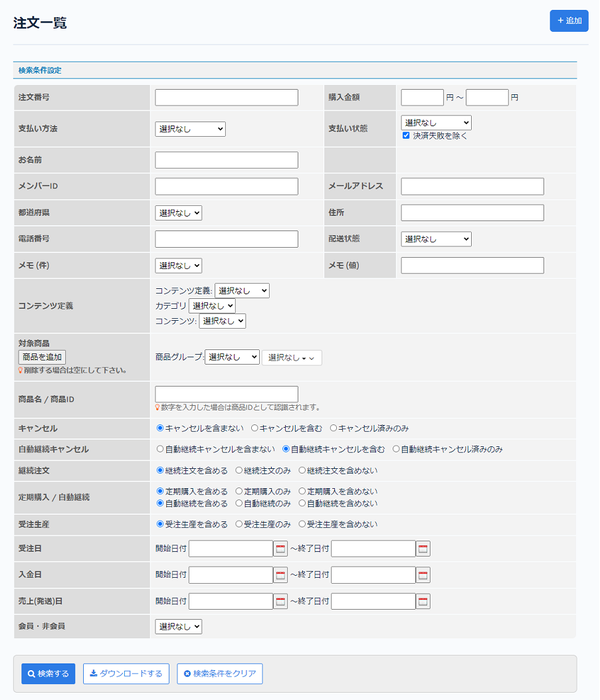
| Field | Description |
|---|---|
| Order ID | Enter the order ID. |
| Purchase price | Enter the range of the purchase price. |
| Payment method | Select the payment method. |
| Payment status | Select the payment status. |
| Name | Enter the orderer's name. |
| Member ID | Enter the member ID. |
| Email address | Enter the email address. |
| Prefecture | Select the prefecture. |
| Address | Enter the address. |
| Contact number | Enter the phone number. |
| Delivery status | Select the delivery status. |
| Memo (field) | Select the name of the memo field (Memo 1 to Memo 10). |
| Memo (value) | Enter the value of the memo field. The field selected in [Memo (field)] is searched. |
| Content structure | Select the content structure of the ordered products. |
| Target product | Select the SKU of the ordered products. |
| Product name/Product ID | Enter the product name or product ID. |
| Cancel | Select the cancellation condition. |
| Cancel automatic renewal | Select the condition for cancellation of automatic renewal. |
| Subscription order | Select the condition for subscription orders. |
| Recurring orders/Automatic renewal | Select the condition for recurring orders/automatic renewal. |
| Made-to-order | Select the condition for made-to-order. |
| Order date | Set the order date. |
| Paid date | Set the payment date. |
| Sales (shipping) date | Set the sales (shipping) date. |
| Member / Non-member | Select member or non-member. |
| Search | Searches orders with the configured conditions. |
| Download | Downloads the order list as a CSV file. |
| Clear search criteria | Clears the configured search criteria. |
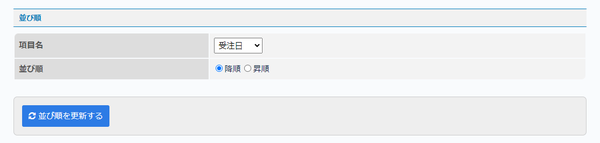
Sort order
| Field | Description |
|---|---|
| Field name | Select the field used for sorting. |
| Sort order | Select descending or ascending order. |
| Update sorting | Click to update the sort order of the order list. |
Order data upload
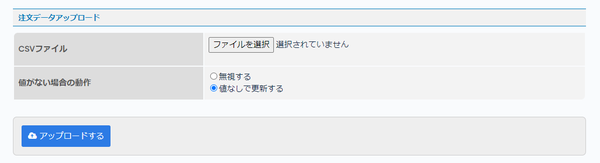
| Field | Description |
|---|---|
| CSV file | Click [Select file] and select the CSV file to upload. You can get a sample CSV file from the [Download] button. |
| No value behavior | Set the behavior when there is no value. |
| Upload | Click to upload the selected CSV file. |
Order list
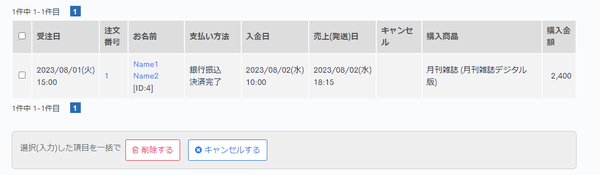
| Field | Description |
|---|---|
| Order date | Displays the order date. |
| Order ID | Displays the order ID. Click the link to go to the Order details page. |
| Name | Displays the orderer's name. |
| Payment method | Displays the payment method. |
| Paid date | Displays the payment date. |
| Sales (shipping) date | Displays the sales (shipping) date. |
| Cancel | Displays one or more of the following values depending on the cancellation status of the order. "Order" "Recurring orders" "Automatic renewal" |
| Ordered product | Displays information about the purchased products. |
| Purchase price | Displays the price of the purchased products. |
Batch actions
Check the checkboxes at the left of the list and click [Delete] or [Cancel] to apply the action to the selected orders at once.
Related documents
Support
If you have any other questions, please contact us or check out Our Slack Community.