Delivery processing
In Delivery processing, you can process the delivery of products currently purchased on a recurring basis.
Accessing the screen
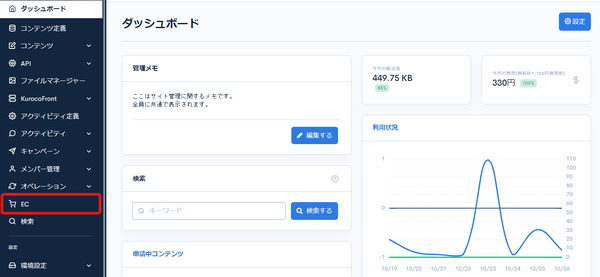
Click [EC].
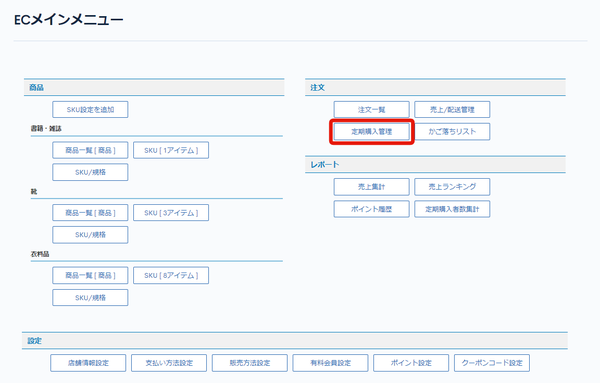
 In the E-commerce main menu, click [Regular purchase management].
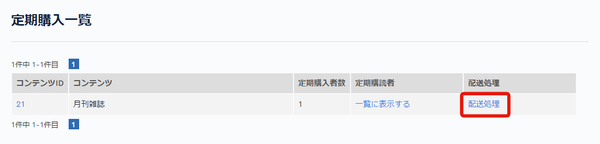
 On the regular purchase list page, click [Delivery processing] for the content you want to update.
Field descriptions
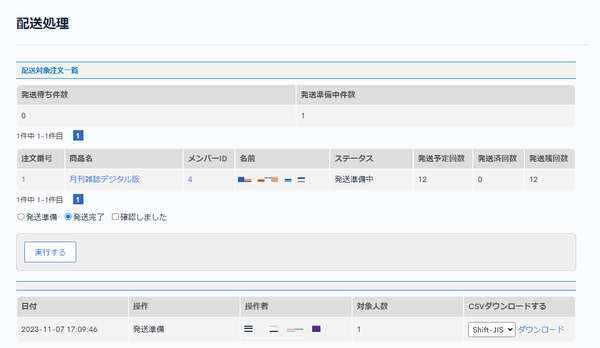
Orders to deliver
| Field | Description |
|---|---|
| Pending delivery count | Displays the number of orders waiting for shipment. |
| Preparing for delivery (Total) | Displays the number of orders being prepared for shipment. |
| Order ID | Displays the order ID. |
| Product name | Displays the title of the product. |
| Member ID | Displays the member ID of the member who made the recurring purchase. |
| Name | Displays the name of the member who made the recurring purchase. |
| Status | Displays the status of the order. |
| Sending limit times | Displays the planned number of shipments. |
| Sending completed times | Displays the number of completed shipments. |
| Sending rest times | Displays the remaining number of shipments. |
Buttons
| Field | Description |
|---|---|
| Preparation for delivery | Displays the list of orders waiting for shipment. When executed, the target orders are set to "preparing for shipment". |
| Shipment completed | Displays the list of orders being prepared for shipment. When executed, the target orders are set to "shipment completed". |
| I confirmed. | This must be checked when updating the status. |
| Execute | Select [Preparation for delivery] or [Shipment completed], check [I confirmed.], and click [Execute] to update the status of the orders. |
History
| Field | Description |
|---|---|
| Date | Displays the date the operation was executed. |
| Operation | Displays the operation (preparation for delivery or shipment completed). |
| Operator | Displays the member who executed the operation. |
| Number of candidate | Displays the number of people targeted by the operation. |
| CSV download | Click [Download] to download the details of the operation as a CSV file. |
Related documents
Support
If you have any other questions, please contact us or check out Our Slack Community.