Sales/delivery management
In Sales/delivery management, you can view paid orders and process sales and shipping.
Accessing the screen
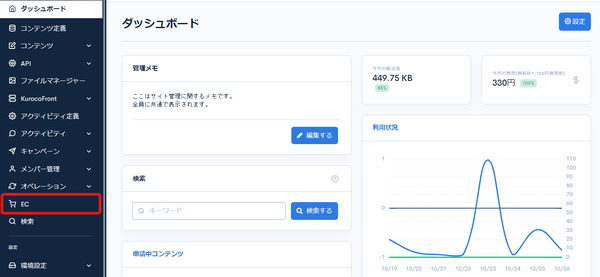
Click [EC].
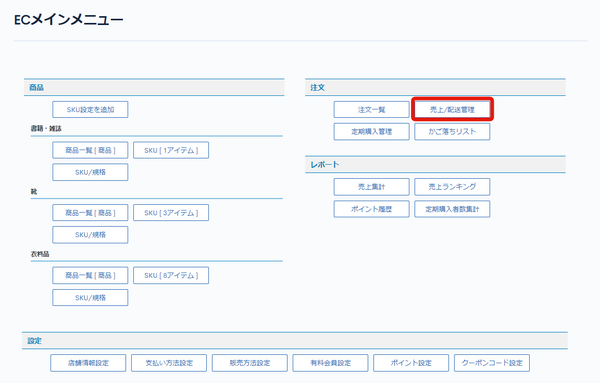
 In the E-commerce main menu, click [Sales/delivery management].
Field descriptions
Search criteria
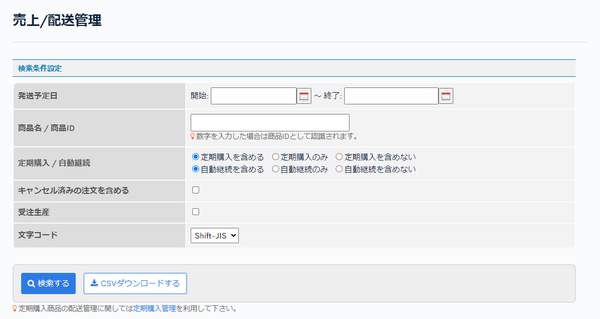
You can search for the orders to process sales/delivery for.
| Field | Description |
|---|---|
| Expected shipping date | Set the expected shipping date. |
| Product name/Product ID | Enter the product name or product ID. |
| Recurring orders/Automatic renewal | Set the condition for recurring orders/automatic renewal. |
| Include cancelled order | Check this to include cancelled orders. |
| Made-to-order | Check this to search for orders of products for which [Made-to-order] is set on the Product settings screen. |
| Charset | Set the character encoding. |
| Search | Searches sales/deliveries with the configured conditions. |
| CSV download | Downloads the sales/delivery list as a CSV file with the configured search criteria. |
Sales/delivery list
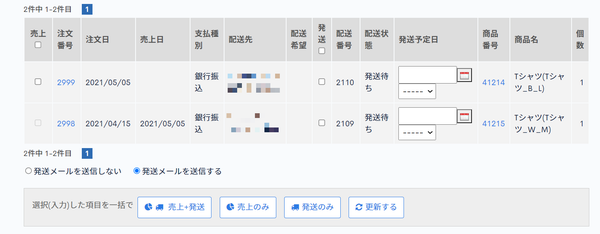
Displays the list of orders to process sales/delivery for.
Orders whose payment status is set to "complete settlement" on the Order details screen are displayed.
| Field | Description |
|---|---|
| Sales | Check this and click [Sales only] to process the sale. |
| Order ID | Displays the order ID. Click it to go to the Order details page. |
| Order date | Displays the order date. |
| Sales date | Displays the sales date. |
| Payment type | Displays the payment type. |
| Delivery address | Displays the delivery address. |
| Delivery request | Displays the delivery request. |
| Delivery | Check this and click [Delivery only] to process the shipment. |
| Delivery No. | Displays the delivery number. The number is assigned automatically. |
| Delivery status | Displays the delivery status. |
| Expected shipping date | Enter the expected shipping date. |
| Product Number | Displays the product number. Click it to go to the Product settings page. |
| Product name | Displays the product name. |
| Quantity | Displays the quantity. |
Buttons
| Field | Description |
|---|---|
| Sales + Delivery | Click to process both the sale and the shipment for the checked orders. |
| Sales only | Click to process the sale for the checked orders. |
| Delivery only | Click to process the shipment for the checked orders. |
| Update | Click to update the expected shipping dates. |
Related documents
Support
If you have any other questions, please contact us or check out Our Slack Community.