Coupon code settings
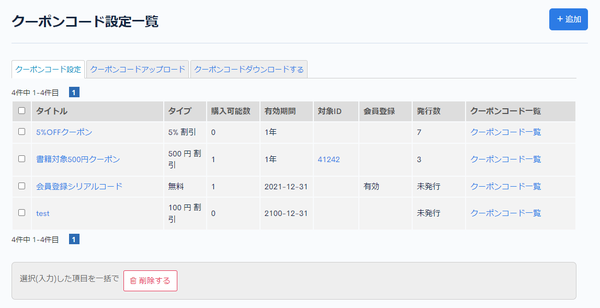
In Coupon code settings, you can view the list of coupon code settings registered in Kuroco.
Accessing the screen
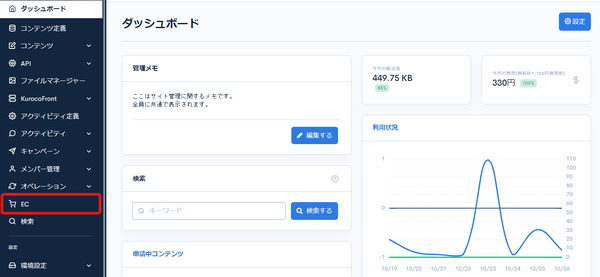
Click [EC].
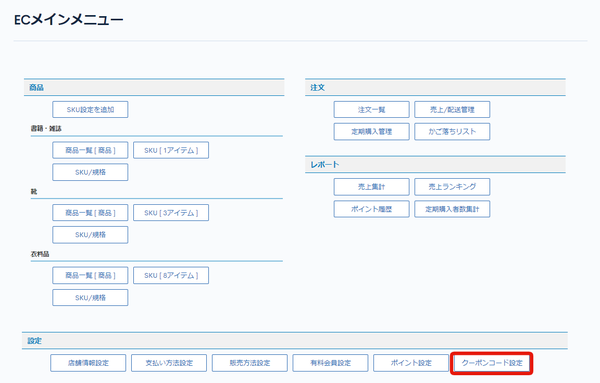
 In the E-commerce main menu, click [Coupon code settings].
Field descriptions
| Field | Description |
|---|---|
| Title | Displays the title of the coupon code. |
| Type | Displays the type of the coupon code. |
| Number of purchasable product(s) | Displays the number of times the coupon code can be used. |
| Validity period | Displays the validity period of the coupon code. |
| Target ID | When Target product is set, displays the product ID and a link to the product. |
| Member registration | Displays "Enabled" when Use on member register is checked. |
| Publish count | The number of issued coupon codes (cumulative total including used ones). |
| Coupon code list | Click to go to the page where you can issue coupon codes and view the list of issued coupon codes. |
Batch actions
Check the checkboxes at the left of the list and click [Delete] to apply the action to the selected coupon code settings at once.
Related documents
Support
If you have any other questions, please contact us or check out Our Slack Community.