Payment method settings
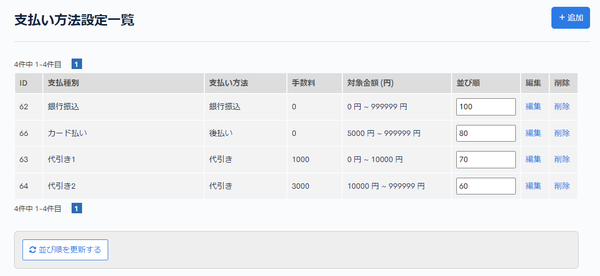
In Payment method settings, you can view the payment methods registered in Kuroco.
Accessing the screen
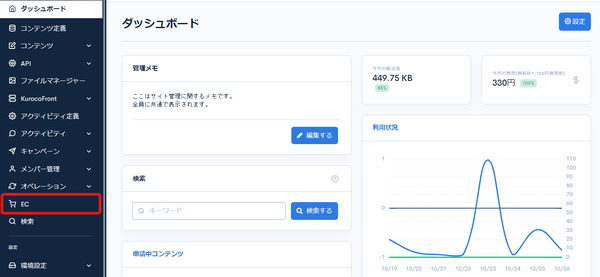
Click [EC].
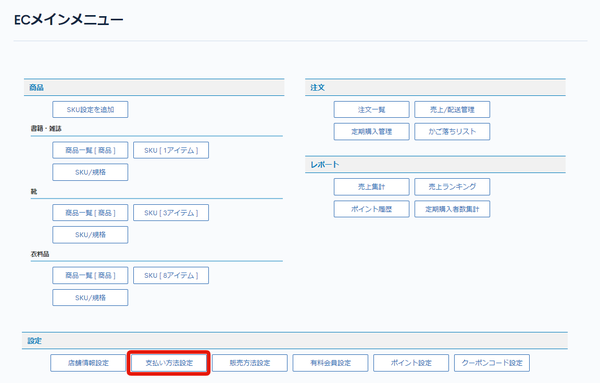
 In the E-commerce main menu, click [Payment method settings].
Field descriptions
| Field | Description |
|---|---|
| ID | Displays the ID of the payment method. The ID is assigned automatically. |
| Payment type | Displays the payment name set in Payment method edit. |
| Payment method | Displays the payment method. |
| Fee | Displays the fee. |
| Price range (JPY) | Displays the amount range in which the payment method can be used. |
| Sort order | Items are sorted in descending order of the number. Enter values in the list and click [Update sorting] at the bottom of the screen to change only the sort order from the list. |
| Edit | Click to go to the Payment method edit page. |
| Delete | Click to delete the payment method. |
Related documents
Support
If you have any other questions, please contact us or check out Our Slack Community.