Sales method settings edit
In Sales method settings edit, you can edit the settings of a sales method.
Accessing the screen
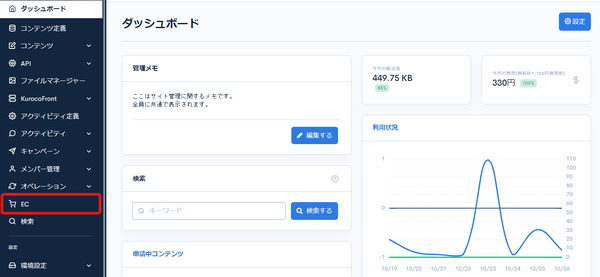
Click [EC].
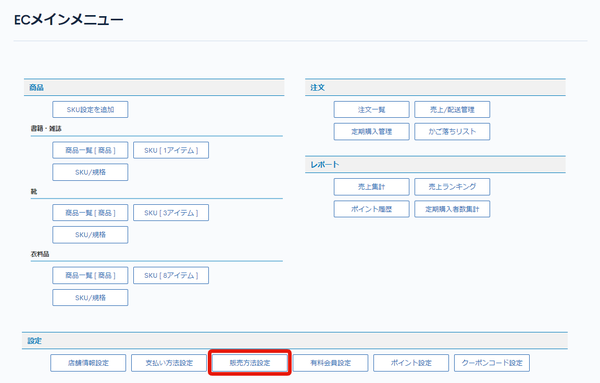
 In the E-commerce main menu, click [Sales method settings].
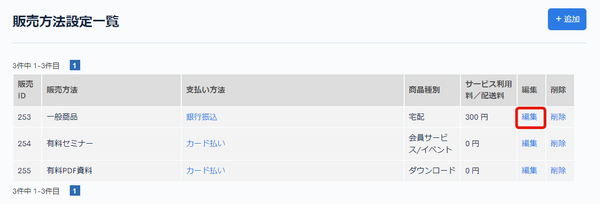
 On the Sales method settings page, click [Edit] for the sales method you want to edit.
Field descriptions
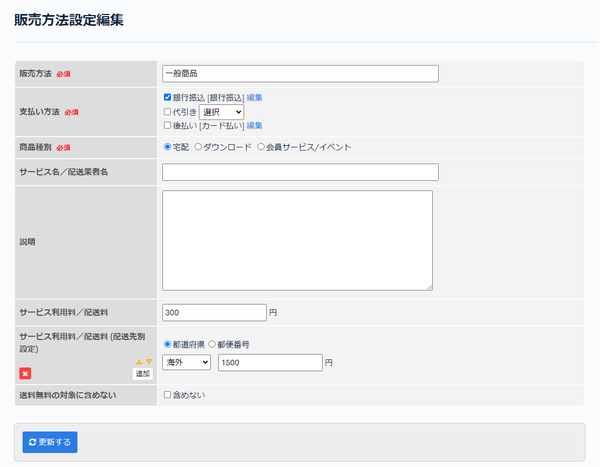
| Field | Description |
|---|---|
| Sales method | Enter the name of the sales method. |
| Payment method | Set the available payment methods. Click [Edit] to open the Payment method edit page. |
| Product type | Select the product type. |
| Service name / Delivery company name | Enter the service name / delivery company name. |
| Description | Enter a description of the sales method. |
| Service charge / delivery fee | Enter the service charge / delivery fee applied when this sales method is selected. |
| Service charge / delivery fee (by delivery destination) | To set the service charge / delivery fee by delivery destination, configure it by prefecture or postal code. |
| Exclude from free delivery condition | Check this to exclude the sales method from free delivery. |
Update button
| Field | Description |
|---|---|
| Update | Click to apply the changes to the sales method. |
Related documents
Support
If you have any other questions, please contact us or check out Our Slack Community.